<?xml version="1.0" encoding="utf-8"?><feed xmlns="http://www.w3.org/2005/Atom" ><generator uri="https://jekyllrb.com/" version="4.2.2">Jekyll</generator><link href="/feed.xml" rel="self" type="application/atom+xml" /><link href="/" rel="alternate" type="text/html" /><updated>2025-09-12T20:24:13+00:00</updated><id>/feed.xml</id><title type="html">kworkflow</title><subtitle>kworflow blog post</subtitle><entry><title type="html">GSoC24 Final Report</title><link href="/gsoc24-final-report/" rel="alternate" type="text/html" title="GSoC24 Final Report" /><published>2024-08-23T22:24:25+00:00</published><updated>2024-08-23T22:24:25+00:00</updated><id>/gsoc24-final-report</id><content type="html" xml:base="/gsoc24-final-report/"><![CDATA[<p>Well, after spending the last few months studying and contributing to
<a href="https://kworkflow.org/">kworkflow</a> as part of <strong>Google Summer of Code 2024</strong>
under the <strong>Linux Foundation</strong>, it’s time to catalog all the contributions made
during this period. I can confidently say that this experience has been
extremely enriching and has significantly advanced my development skills.</p>

<h1 id="proposal">Proposal</h1>

<p>My GSoC24 proposal focused on enhancing and expanding the integration tests for
<strong>kworkflow</strong>, which previously had only unit tests and a starting
infrastructure for the integration tests. Throughout the program, I worked on
introducing, enhancing, and solidifying these integration tests to ensure more
effective validation of the project’s features. Additionally, I aimed to make
the test suite easily expandable by implementing clear standards and robust
infrastructure. This approach allows future contributors to add new tests with
minimal effort, ensuring that the suite can grow alongside the project.</p>

<h1 id="overall-progress">Overall Progress</h1>

<p>Throughout my participation in the GSoC24, I achieved significant milestones
that reflect both the breadth and depth of my contributions.</p>

<h3 id="key-achievements">Key Achievements</h3>

<ol>
  <li>
    <p><strong>Enhanced Integration Test Coverage</strong>: I focused on making the test
infrastructure stronger and more scalable. I improved the existing
integration tests and added new ones for important features like <code class="language-plaintext highlighter-rouge">kw ssh</code>, <code class="language-plaintext highlighter-rouge">kw
build</code>, and <code class="language-plaintext highlighter-rouge">kw deploy</code>. This significantly increased the range of tested
scenarios.</p>

    <p><img src="/images/kw_ssh_example.png" alt="Picture" /></p>
  </li>
  <li>
    <p><strong>Adaptation of CI for Integration Tests</strong>: As part of enhancing the testing
process, I adapted the GitHub Actions CI workflow to include the execution
of integration tests.</p>

    <p><img src="/images/integration_github_ci.png" alt="Picture" /></p>
  </li>
  <li>
    <p><strong>Refinement of the kworkflow test script</strong>: During the refinement of the
integration tests, the <code class="language-plaintext highlighter-rouge">run_tests.sh</code> script used to execute the kw tests
was updated to include a <code class="language-plaintext highlighter-rouge">--verbose</code> option. This option aids in debugging by
displaying detailed information about the Podman containers, such as real-time
status and specific data to identify which container from which distribution is
being started.</p>

    <p><img src="/images/run_tests.gif" alt="Picture" /></p>

    <p>By default, running <code class="language-plaintext highlighter-rouge">./run_tests.sh</code> without any optopns will execute only unit
tests, which helps reduce execution time. An <code class="language-plaintext highlighter-rouge">--all</code> option was implemented for
users who want to run all tests, including time-consuming integration tests.
For example, the <code class="language-plaintext highlighter-rouge">kw build</code> integration test involves kernel compilation, which
can be lengthy. If a contributor makes a minor change that doesn’t affect <code class="language-plaintext highlighter-rouge">kw
build</code>` functionality, running the full integration tests is unnecessary. This
update ensures more efficient test runs by allowing contributors to focus on
relevant tests only.</p>
  </li>
</ol>

<h1 id="challenges-and-solutions">Challenges and Solutions</h1>

<p>During my journey in the Google Summer of Code, I faced several challenges
while implementing and improving integration tests for kworkflow. Initially,
adapting the tests to run in Podman containers was a considerable challenge. I
resolved this by thoroughly studying the <a href="https://docs.podman.io/en/latest/">Podman
documentation</a> and adjusting the test
scripts to ensure compatibility and performance within the testing framework.</p>

<p>Another major challenge was integrating tests for the <code class="language-plaintext highlighter-rouge">kw build</code> feature due to
the extended time required for kernel compilation. To mitigate this issue, the
tests were adapted to run on only one random distribution, saving both time and
resources. I utilized Podman containers and the
<a href="https://github.com/kward/shunit2">shUnit2</a> framework to organize the tests,
along with specific scripts to monitor and validate CPU usage with the
<code class="language-plaintext highlighter-rouge">--cpu-scaling</code> option. This allowed <code class="language-plaintext highlighter-rouge">kw build</code> to be tested without the need
to compile the entire kernel</p>

<p>The integration tests for the <code class="language-plaintext highlighter-rouge">kw ssh</code> feature were more complex due to the use
of nested containers. Adapting the tests for this scenario was challenging, but
it also provided a valuable learning opportunity. Additionally, I had to manage
the execution of commands with special characters inside the containers. To
address this, I developed functions to ensure that these commands were
correctly interpreted by the shell.</p>

<p>Throughout my GSoC24 experience, I encountered numerous challenges, but I was
able to overcome them thanks to the consistent support from my mentors, who
were always available to address my questions. Beyond the dedicated meetings
for my project, the weekly discussions with the kworkflow community proved
extremely helpful. These sessions offered broader insights and helped ensure
that my work was in line with the community’s goals and expectations.</p>

<h1 id="blogpost-series-timeline">Blogpost Series Timeline</h1>

<p>This post is a high-level view of my GSoC24 project. A more detailed and
technical overview of the work done can be seen in previous posts. I have
prepared a series of blog posts that explore different aspects of the
<strong>kworkflow</strong> project. Here is a timeline of the posts, with direct links to
each one:</p>

<ol>
  <li>
    <p><a href="/got-accepted-into-gsoc/">Accepted to Google Summer of Code 2024</a></p>
  </li>
  <li>
    <p><a href="/introduction-to-integration-testing/">Introduction to Integration Testing in kworkflow </a></p>
  </li>
  <li>
    <p><a href="/integration-for-kw-ssh/">Integration Testing for kw ssh</a></p>
  </li>
  <li>
    <p><a href="/integration-for-kw-build/">Integration Testing for kw build</a></p>
  </li>
</ol>

<h1 id="contributions">Contributions</h1>

<p>Throughout the project, I created several pull requests (PRs) addressing
different aspects of kworkflow. Each PR was carefully crafted to enhance
functionality, increase test coverage, and/or ensure code robustness. Below are
some of the most significant PRs:</p>

<table>
  <thead>
    <tr>
      <th>Pull Request</th>
      <th style="text-align: center">N° of Commits</th>
    </tr>
  </thead>
  <tbody>
    <tr>
      <td><a href="https://github.com/kworkflow/kworkflow/pull/1108">setup: install kernel build dependencies</a></td>
      <td style="text-align: center">4</td>
    </tr>
    <tr>
      <td><a href="https://github.com/kworkflow/kworkflow/pull/1135">tests: integration: device_test: modify kw device integration test to run entirely in container</a></td>
      <td style="text-align: center">2</td>
    </tr>
    <tr>
      <td><a href="https://github.com/kworkflow/kworkflow/pull/1113">tests: integration: refactor kw_version_test to run entirely in container</a></td>
      <td style="text-align: center">1</td>
    </tr>
    <tr>
      <td><a href="https://github.com/kworkflow/kworkflow/pull/1130">run_tests: dedicate a container per test file for integration tests</a></td>
      <td style="text-align: center">2</td>
    </tr>
    <tr>
      <td><a href="https://github.com/kworkflow/kworkflow/pull/1148">run_tests: streamline test execution logic</a></td>
      <td style="text-align: center">1</td>
    </tr>
    <tr>
      <td><a href="https://github.com/kworkflow/kworkflow/pull/1055">tests: integration: self_update_test: add self-update test</a></td>
      <td style="text-align: center">3</td>
    </tr>
    <tr>
      <td><a href="https://github.com/kworkflow/kworkflow/pull/1161">tests: integration: deploy_test: introducing deploy tests</a></td>
      <td style="text-align: center">2</td>
    </tr>
    <tr>
      <td><a href="https://github.com/kworkflow/kworkflow/pull/1116">tests: integration: kw_ssh_test: Add integration tests for kw ssh functionality</a></td>
      <td style="text-align: center">5</td>
    </tr>
    <tr>
      <td><a href="https://github.com/kworkflow/kworkflow/pull/1143">tests: integration: build_test: add the kw build test</a></td>
      <td style="text-align: center">3</td>
    </tr>
  </tbody>
</table>

<p>However, these PRs represent only the visible contributions. A significant
amount of work was done behind the scenes, including researching the best
approaches, communicating with mentors, gathering feedback, and iterating on
solutions. This “offline” work was crucial in shaping the direction and quality
of the contributions.</p>

<h3 id="features-in-development-almost-ready-to-be-merged">Features in Development: Almost Ready to be Merged</h3>

<p>The PRs listed above include features that are actively in development, such as
tests for the <code class="language-plaintext highlighter-rouge">kw ssh</code>, <code class="language-plaintext highlighter-rouge">kw build</code>, and <code class="language-plaintext highlighter-rouge">kw deploy</code> functionalities. Although
many of these PRs are already well-structured, they are still undergoing final
reviews and refinements. A significant portion of the important decisions has
already been discussed within the kworkflow community, and have the green light
of the mentors, so I can safely say that the direction of my project is set and
aligned with kworkflow goals and needs.</p>

<h1 id="next-steps">Next Steps</h1>

<p>As a long-time contributor to <strong>kworkflow</strong>, I am committed to continuing my
contributions to the project. Here are the key areas I plan to focus on:</p>

<ol>
  <li>
    <p><strong>Expanding even more the Integration Test Coverage</strong>:
 Continuing to expand the test coverage is a priority. I will work on creating
 and refining tests for additional functionalities that have not yet been fully
 covered, ensuring a comprehensive and effective validation process. Although
 this initial phase involved tackling complex and diverse features such as <code class="language-plaintext highlighter-rouge">kw
 build</code>, <code class="language-plaintext highlighter-rouge">kw deploy</code>, <code class="language-plaintext highlighter-rouge">kw device</code>, and <code class="language-plaintext highlighter-rouge">kw ssh</code>, which required significant
 effort due to their intricate infrastructure, this groundwork has paved the way
 for easier and more straightforward expansion of the test suite. The standards
 and infrastructure established during this process will streamline the addition
 and revision of tests, making future coverage enhancements more efficient and
 scalable.</p>
  </li>
  <li>
    <p><strong>Migrating to New CI Pipeline</strong>:
 An important next step is migrating the integration tests to a new CI pipeline
 which is being developed with” <strong>Jenkins</strong> by Marcelo Spessoto, a fellow Google
 Summer of Code 2024 participant working on the kworkflow project. This
 migration will demand some small tinkering on my end to accommodate the
 integration tests pipeline in this new infrastructure. Nevertheless, thanks to
 close communication with my fellow kworkflow contributor, we are confident that
 this will happen as seamlessly as possible</p>
  </li>
  <li>
    <p><strong>Implementing Acceptance Tests</strong>:
 I plan to develop acceptance tests that will validate multiple functionalities
 in sequence. These tests will ensure that the integration of various features
 works seamlessly and meets the overall requirements of the project.</p>
  </li>
  <li>
    <p><strong>Improving Documentation</strong>:
 I will focus on improving the documentation specifically related to the
 integration testing processes within the project. This includes updating
 existing documentation to reflect new practices, enhancing clarity, and
 ensuring that all relevant information is accessible and useful to contributors
 and users alike. By providing clear and detailed documentation, the integration
 testing process will become more transparent and easier for future contributors
 to understand and build upon.</p>
  </li>
</ol>

<h1 id="acknowledgments">Acknowledgments</h1>

<p>I would like to express my deep gratitude to my mentors, <strong>David de Barros
Tadokoro</strong>, <strong>Rodrigo Siqueira</strong>, <strong>Paulo Meirelles</strong>, and <strong>Magali Lemes</strong>.
Your attention, ideas, and feedback were crucial to the success of this project
and made the journey much more enriching. I sincerely appreciate your constant
support and valuable contributions :-).</p>

<p>Additionally, I would like to thank the <strong>Linux Foundation</strong> for the
opportunity to participate in Google Summer of Code 2024. It was an incredible
and transformative experience.</p>]]></content><author><name>Aquila Macedo</name></author><category term="kw" /><category term="gsoc" /><category term="integration_testing" /><summary type="html"><![CDATA[Well, after spending the last few months studying and contributing to kworkflow as part of Google Summer of Code 2024 under the Linux Foundation, it’s time to catalog all the contributions made during this period. I can confidently say that this experience has been extremely enriching and has significantly advanced my development skills.]]></summary></entry><entry><title type="html">Integration Testing for kw-build</title><link href="/integration-for-kw-build/" rel="alternate" type="text/html" title="Integration Testing for kw-build" /><published>2024-08-20T11:21:54+00:00</published><updated>2024-08-20T11:21:54+00:00</updated><id>/integration-for-kw-build</id><content type="html" xml:base="/integration-for-kw-build/"><![CDATA[<p>The <code class="language-plaintext highlighter-rouge">kw build</code> command is a versatile tool that encompasses everything related
to building and managing Linux kernel images. It supports various options, such
as displaying build information, invoking kernel <strong>menuconfig</strong>, enabling
<strong>ccache</strong>, adjusting CPU usage during compilation, saving logs, and using the
<strong>LLVM</strong> toolchain. Additionally, it provides options for cleaning the build
environment, customizing <strong>CFLAGS</strong>, and compiling specific commits. The
command also offers alert notifications and verbose mode for detailed debugging
information.</p>

<h1 id="overcoming-the-initial-challenges-in-kw-build-integration-testing">Overcoming the Initial Challenges in kw build Integration Testing</h1>

<p>One of the main challenges I’ve encountered while building integration tests
for <code class="language-plaintext highlighter-rouge">kw build</code> was the significant time required to compile the kernel, a
notoriously time-consuming task. I configured the integration tests to be
triggered on <em>pushes</em> and <em>pull requests</em>. However, as the number of tests
increases, the execution time on <strong>GitHub Actions</strong>’ CI also grows, which
eventually will become impractical. The primary reason for this was that the
tests were executed across three different distributions (<strong>Debian</strong>,
<strong>Fedora</strong>, <strong>Arch Linux</strong>). This meant that each test had to be run in all
three distros, which overloaded the execution time.</p>

<p>Given the limitations of the machines available on <strong>GitHub Actions</strong>, which
are not robust enough to handle the workload required to compile the kernel in
three distinct environments, the best decision at the time was to limit <code class="language-plaintext highlighter-rouge">kw
build</code> integration tests to just one distro. It was implemented a function
that randomly selects one of these three distros for each test run. This allows
us to test <code class="language-plaintext highlighter-rouge">kw build</code> in different environments while significantly reducing
the time and resources consumed by CI.</p>

<h1 id="structured-testing-approach-with-podman-and-shunit2">Structured Testing Approach with Podman and shUnit2</h1>

<p>The integration testing framework for the <code class="language-plaintext highlighter-rouge">kw build</code> feature is built using
Podman Containers, which allows us to simulate different environments in an
isolated and controlled manner. To ensure that the functionalities of <code class="language-plaintext highlighter-rouge">kw
build</code> are thoroughly tested, the <strong>shUnit2</strong> framework is used, providing a
solid foundation for writing and running shell script tests efficiently.</p>

<p>As mentioned in the introductory post about integration testing, <strong>shUnit2</strong>
offers “magic” functions that simplify the organization and execution of tests.
For more details about these features, check out the dedicated
<a href="/introduction-to-integration-testing/">post</a>.</p>

<h2 id="initial-environment-setup-onetimesetup">Initial Environment Setup: oneTimeSetUp()</h2>

<p>Before executing any tests, it’s crucial to correctly set up the environment to
ensure everything is in order. For the integration tests of <code class="language-plaintext highlighter-rouge">kw build</code>, this
setup is managed by the <code class="language-plaintext highlighter-rouge">oneTimeSetUp()</code> function. This special function is
designed to run once before any test functions (i.e., any function prefixed
with test_). It ensures the test environment is properly configured by
selecting a random Linux distribution, cloning the <strong>mainline</strong> Kernel
repository, and installing the necessary dependencies. Here’s a detailed look
at how this setup is accomplished:</p>

<div class="language-bash highlighter-rouge"><div class="highlight"><pre class="highlight"><code><span class="nb">declare</span> <span class="nt">-g</span> CLONED_KERNEL_TREE_PATH_HOST
<span class="nb">declare</span> <span class="nt">-g</span> TARGET_RANDOM_DISTRO
<span class="nb">declare</span> <span class="nt">-g</span> KERNEL_TREE_PATH_CONTAINER
<span class="nb">declare</span> <span class="nt">-g</span> CONTAINER

<span class="k">function </span>oneTimeSetUp<span class="o">()</span>
<span class="o">{</span>
  <span class="nb">local </span><span class="nv">url_kernel_repo_tree</span><span class="o">=</span><span class="s1">'https://github.com/torvalds/linux'</span>

  <span class="c"># Select a random distro for the tests</span>
  <span class="nv">TARGET_RANDOM_DISTRO</span><span class="o">=</span><span class="si">$(</span>select_random_distro<span class="si">)</span>
  <span class="nv">CLONED_KERNEL_TREE_PATH_HOST</span><span class="o">=</span><span class="s2">"</span><span class="si">$(</span><span class="nb">mktemp</span> <span class="nt">--directory</span><span class="si">)</span><span class="s2">/linux"</span>
  <span class="nv">CONTAINER</span><span class="o">=</span><span class="s2">"kw-</span><span class="k">${</span><span class="nv">TARGET_RANDOM_DISTRO</span><span class="k">}</span><span class="s2">"</span>

  <span class="c"># The VERBOSE variable is set and exported in the run_tests.sh script based</span>
  <span class="c"># on the command-line options provided by the user. It controls the verbosity</span>
  <span class="c"># of the output during the test runs.</span>
  setup_container_environment <span class="s2">"</span><span class="nv">$VERBOSE</span><span class="s2">"</span> <span class="s1">'build'</span> <span class="s2">"</span><span class="nv">$TARGET_RANDOM_DISTRO</span><span class="s2">"</span>

  <span class="c"># Install kernel build dependencies</span>
  container_exec <span class="s2">"</span><span class="nv">$CONTAINER</span><span class="s2">"</span> <span class="s1">'yes | ./setup.sh --install-kernel-dev-deps &gt; /dev/null 2&gt;&amp;1'</span>
  <span class="k">if</span> <span class="o">[[</span> <span class="s2">"</span><span class="nv">$?</span><span class="s2">"</span> <span class="nt">-ne</span> 0 <span class="o">]]</span><span class="p">;</span> <span class="k">then
    </span>complain <span class="s2">"Failed to install kernel build dependencies for </span><span class="k">${</span><span class="nv">TARGET_RANDOM_DISTRO</span><span class="k">}</span><span class="s2">"</span>
    <span class="k">return </span>22 <span class="c"># EINVAL</span>
  <span class="k">fi

  </span>git clone <span class="nt">--depth</span> 5 <span class="s2">"</span><span class="nv">$url_kernel_repo_tree</span><span class="s2">"</span> <span class="s2">"</span><span class="nv">$CLONED_KERNEL_TREE_PATH_HOST</span><span class="s2">"</span> <span class="o">&gt;</span> /dev/null 2&gt;&amp;1
  <span class="k">if</span> <span class="o">[[</span> <span class="s2">"</span><span class="nv">$?</span><span class="s2">"</span> <span class="nt">-ne</span> 0 <span class="o">]]</span><span class="p">;</span> <span class="k">then
    </span>complain <span class="s2">"Failed to clone </span><span class="k">${</span><span class="nv">url_kernel_repo_tree</span><span class="k">}</span><span class="s2">"</span>
    <span class="k">if</span> <span class="o">[[</span> <span class="nt">-n</span> <span class="s2">"</span><span class="nv">$CLONED_KERNEL_TREE_PATH_HOST</span><span class="s2">"</span> <span class="o">]]</span><span class="p">;</span> <span class="k">then
      if </span>is_safe_path_to_remove <span class="s2">"</span><span class="nv">$CLONED_KERNEL_TREE_PATH_HOST</span><span class="s2">"</span><span class="p">;</span> <span class="k">then
        </span><span class="nb">rm</span> <span class="nt">--recursive</span> <span class="nt">--force</span> <span class="s2">"</span><span class="nv">$CLONED_KERNEL_TREE_PATH_HOST</span><span class="s2">"</span>
      <span class="k">else
        </span>complain <span class="s2">"Unsafe path: </span><span class="k">${</span><span class="nv">CLONED_KERNEL_TREE_PATH_HOST</span><span class="k">}</span><span class="s2"> - Not removing"</span>
      <span class="k">fi
    else
      </span>complain <span class="s1">'Variable CLONED_KERNEL_TREE_PATH_HOST is empty or not set'</span>
    <span class="k">fi
  fi</span>
<span class="o">}</span>
</code></pre></div></div>

<p>This method not only prepares the test environment but also establishes a solid
foundation for the subsequent tests to be executed efficiently.</p>

<h2 id="per-test-environment-setup-setup">Per-Test Environment Setup: setUp()</h2>

<p>The <code class="language-plaintext highlighter-rouge">setUp()</code> function plays a crucial role in setting up the test environment,
but with a different approach compared to the <code class="language-plaintext highlighter-rouge">oneTimeSetUp()</code>. While
<code class="language-plaintext highlighter-rouge">oneTimeSetUp()</code> handles tasks that need to be executed only once before all
tests, such as setting up the base environment and cloning the mainline kernel
repository on the host machine, <code class="language-plaintext highlighter-rouge">setUp()</code> is called before each individual test.
It contains the sequence of tasks that need to be done before every test in the
test suite (in this case, the <code class="language-plaintext highlighter-rouge">kw build</code> integration test suite).</p>

<div class="language-bash highlighter-rouge"><div class="highlight"><pre class="highlight"><code><span class="k">function </span>setUp<span class="o">()</span>
<span class="o">{</span>
  <span class="nv">KERNEL_TREE_PATH_CONTAINER</span><span class="o">=</span><span class="s2">"</span><span class="si">$(</span>container_exec <span class="s2">"</span><span class="nv">$CONTAINER</span><span class="s2">"</span> <span class="s1">'mktemp --directory'</span><span class="si">)</span><span class="s2">/linux"</span>
  <span class="k">if</span> <span class="o">[[</span> <span class="s2">"</span><span class="nv">$?</span><span class="s2">"</span> <span class="nt">-ne</span> 0 <span class="o">]]</span><span class="p">;</span> <span class="k">then
    </span>fail <span class="s2">"(</span><span class="k">${</span><span class="nv">LINENO</span><span class="k">}</span><span class="s2">): Failed to create temporary directory in container."</span>
  <span class="k">fi

  </span>setup_kernel_tree_with_config_file <span class="s2">"</span><span class="nv">$CONTAINER</span><span class="s2">"</span>
<span class="o">}</span>
</code></pre></div></div>

<h3 id="auxiliary-function-setup_kernel_tree_with_config_file">Auxiliary Function: setup_kernel_tree_with_config_file()</h3>

<p>This function copies the <strong>mainline</strong> kernel repository to the container, using
the temporary path created earlier. This happens once the repository has been
cloned on the host machine, optimizing the process for when it’s necessary to
implement tests for the three different distributions, allowing the kernel to
be cloned only once instead of three times.</p>

<p>This approach saves time and resources, especially considering that cloning the
entire <strong>mainline</strong> kernel repository can be time-consuming.</p>

<p>To ensure that the cloning process is quick and efficient, we opted to clone
only the 5 most recent commits from the <strong>mainline</strong> kernel repository. This is
done using the following command:</p>

<div class="language-bash highlighter-rouge"><div class="highlight"><pre class="highlight"><code>git clone <span class="nt">--depth</span> 5 <span class="nt">--quiet</span> <span class="s2">"</span><span class="nv">$url_kernel_repo_tree</span><span class="s2">"</span> <span class="s2">"</span><span class="nv">$CLONED_KERNEL_TREE_PATH_HOST</span><span class="s2">"</span>
</code></pre></div></div>

<p>This approach allows testing the most recent changes without the overhead of
downloading the entire repository history, saving time and resources.</p>

<div class="language-bash highlighter-rouge"><div class="highlight"><pre class="highlight"><code><span class="k">function </span>setup_kernel_tree_with_config_file<span class="o">()</span>
<span class="o">{</span>
  container_copy <span class="s2">"</span><span class="nv">$CONTAINER</span><span class="s2">"</span> <span class="s2">"</span><span class="nv">$CLONED_KERNEL_TREE_PATH_HOST</span><span class="s2">"</span> <span class="s2">"</span><span class="nv">$KERNEL_TREE_PATH_CONTAINER</span><span class="s2">"</span>
  <span class="k">if</span> <span class="o">[[</span> <span class="s2">"</span><span class="nv">$?</span><span class="s2">"</span> <span class="nt">-ne</span> 0 <span class="o">]]</span><span class="p">;</span> <span class="k">then
    </span>fail <span class="s2">"(</span><span class="k">${</span><span class="nv">LINENO</span><span class="k">}</span><span class="s2">): Failed to copy </span><span class="k">${</span><span class="nv">CLONED_KERNEL_TREE_PATH_HOST</span><span class="k">}</span><span class="s2"> to </span><span class="k">${</span><span class="nv">CONTAINER</span><span class="k">}</span><span class="s2">:</span><span class="k">${</span><span class="nv">KERNEL_TREE_PATH_CONTAINER</span><span class="k">}</span><span class="s2">"</span>
  <span class="k">fi

  </span>optimize_dot_config <span class="s2">"</span><span class="nv">$CONTAINER</span><span class="s2">"</span> <span class="s2">"</span><span class="nv">$KERNEL_TREE_PATH_CONTAINER</span><span class="s2">"</span>
<span class="o">}</span>
</code></pre></div></div>

<h3 id="auxiliary-function-optimize_dot_config">Auxiliary Function: optimize_dot_config()</h3>

<p>This function is then called to configure and optimize the kernel <code class="language-plaintext highlighter-rouge">.config</code> file
based on the modules loaded by the <strong>Podman</strong> container.</p>

<div class="language-bash highlighter-rouge"><div class="highlight"><pre class="highlight"><code><span class="k">function </span>optimize_dot_config<span class="o">()</span>
<span class="o">{</span>
  <span class="c"># Generate a list of currently loaded modules in the container</span>
  container_exec <span class="s2">"</span><span class="nv">$CONTAINER</span><span class="s2">"</span> <span class="s2">"cd </span><span class="k">${</span><span class="nv">KERNEL_TREE_PATH_CONTAINER</span><span class="k">}</span><span class="s2"> &amp;&amp; /usr/sbin/lsmod &gt; container_mod_list"</span>
  <span class="k">if</span> <span class="o">[[</span> <span class="s2">"</span><span class="nv">$?</span><span class="s2">"</span> <span class="nt">-ne</span> 0 <span class="o">]]</span><span class="p">;</span> <span class="k">then
    </span>fail <span class="s2">"(</span><span class="k">${</span><span class="nv">LINENO</span><span class="k">}</span><span class="s2">): Failed to generate module list in container."</span>
  <span class="k">fi</span>

  <span class="c"># Create a default configuration and then update it to reflect current settings</span>
  container_exec <span class="s2">"</span><span class="nv">$CONTAINER</span><span class="s2">"</span> <span class="s2">"cd </span><span class="k">${</span><span class="nv">KERNEL_TREE_PATH_CONTAINER</span><span class="k">}</span><span class="s2"> &amp;&amp; make defconfig &gt; /dev/null 2&gt;&amp;1 &amp;&amp; make olddefconfig &gt; /dev/null 2&gt;&amp;1"</span>
  <span class="k">if</span> <span class="o">[[</span> <span class="s2">"</span><span class="nv">$?</span><span class="s2">"</span> <span class="nt">-ne</span> 0 <span class="o">]]</span><span class="p">;</span> <span class="k">then
    </span>fail <span class="s2">"(</span><span class="k">${</span><span class="nv">LINENO</span><span class="k">}</span><span class="s2">): Failed to create default configuration in container."</span>
  <span class="k">fi</span>

  <span class="c"># Optimize the configuration based on the currently loaded modules</span>
  container_exec <span class="s2">"</span><span class="nv">$CONTAINER</span><span class="s2">"</span> <span class="s2">"cd </span><span class="k">${</span><span class="nv">KERNEL_TREE_PATH_CONTAINER</span><span class="k">}</span><span class="s2"> &amp;&amp; make LSMOD=</span><span class="k">${</span><span class="nv">kernel_test_tmp_dir</span><span class="k">}</span><span class="s2">/container_mod_list localmodconfig &gt; /dev/null 2&gt;&amp;1"</span>
  <span class="k">if</span> <span class="o">[[</span> <span class="s2">"</span><span class="nv">$?</span><span class="s2">"</span> <span class="nt">-ne</span> 0 <span class="o">]]</span><span class="p">;</span> <span class="k">then
    </span>fail <span class="s2">"(</span><span class="k">${</span><span class="nv">LINENO</span><span class="k">}</span><span class="s2">): Failed to optimize configuration based on loaded modules in container."</span>
  <span class="k">fi</span>
<span class="o">}</span>
</code></pre></div></div>

<h2 id="final-test-cleanup-onetimeteardown">Final Test Cleanup: oneTimeTearDown()</h2>

<p>The <code class="language-plaintext highlighter-rouge">oneTimeTearDown()</code> function is responsible for cleaning up the test
environment after all test functions have been executed.</p>

<div class="language-bash highlighter-rouge"><div class="highlight"><pre class="highlight"><code><span class="k">function </span>oneTimeTearDown<span class="o">()</span>
<span class="o">{</span>
  <span class="c"># Check if the path is safe to remove</span>
  <span class="k">if </span>is_safe_path_to_remove <span class="s2">"</span><span class="nv">$CLONED_KERNEL_TREE_PATH_HOST</span><span class="s2">"</span><span class="p">;</span> <span class="k">then
    </span><span class="nb">rm</span> <span class="nt">--recursive</span> <span class="nt">--force</span> <span class="s2">"</span><span class="nv">$CLONED_KERNEL_TREE_PATH_HOST</span><span class="s2">"</span>
  <span class="k">fi</span>
<span class="o">}</span>
</code></pre></div></div>

<p>This cleanup is crucial to maintaining a consistent test environment and
avoiding potential conflicts or failures caused by residual files.</p>

<h2 id="per-test-cleanup-teardown">Per-Test Cleanup: tearDown()</h2>

<p>The <code class="language-plaintext highlighter-rouge">tearDown()</code> function plays a crucial role in ensuring that the test
environment is restored to its initial state after each test function is
executed. This is especially important when a test might modify the state of
the mainline kernel repository within the container. To prevent these
modifications from affecting subsequent tests, it is necessary to clean up and
restore the environment.</p>

<div class="language-bash highlighter-rouge"><div class="highlight"><pre class="highlight"><code><span class="k">function </span>tearDown<span class="o">()</span>
<span class="o">{</span>
  container_exec <span class="s2">"</span><span class="nv">$CONTAINER</span><span class="s2">"</span> <span class="s2">"cd </span><span class="k">${</span><span class="nv">KERNEL_TREE_PATH_CONTAINER</span><span class="k">}</span><span class="s2"> &amp;&amp; kw build --full-cleanup &gt; /dev/null 2&gt;&amp;1"</span>
  assert_equals_helper <span class="s2">"kw build --full-cleanup failed for </span><span class="k">${</span><span class="nv">CONTAINER</span><span class="k">}</span><span class="s2">"</span> <span class="s2">"(</span><span class="nv">$LINENO</span><span class="s2">)"</span> 0 <span class="s2">"</span><span class="nv">$?</span><span class="s2">"</span>
<span class="o">}</span>
</code></pre></div></div>

<p>The command <code class="language-plaintext highlighter-rouge">kw build --full-cleanup</code> executed by <code class="language-plaintext highlighter-rouge">tearDown()</code> uses the
<code class="language-plaintext highlighter-rouge">--full-cleanup</code> option, which internally runs the <code class="language-plaintext highlighter-rouge">make distclean</code> command. This
restores the build environment to its initial or default state by removing all
files generated during the build process, including configuration files and
script outputs. This thorough cleanup ensures that any configuration or
modification made during the test is removed, allowing each subsequent test to
start with a clean and consistent environment, which is essential for the
integrity of the tests.</p>

<h1 id="practical-examples-and-testing-scenarios">Practical Examples and Testing Scenarios</h1>

<h2 id="testing-kw-build-default-functionality">Testing kw build Default Functionality</h2>

<p>Let’s delve into more details about the standard test for the <code class="language-plaintext highlighter-rouge">kw build</code> tool.</p>

<div class="language-bash highlighter-rouge"><div class="highlight"><pre class="highlight"><code><span class="k">function </span>test_kernel_build<span class="o">()</span>
<span class="o">{</span>
  <span class="nb">local </span>kw_build_cmd
  <span class="nb">local </span>build_status
  <span class="nb">local </span>build_result
  <span class="nb">local </span>build_status_log

  <span class="nv">kw_build_cmd</span><span class="o">=</span><span class="s1">'kw build'</span>
  container_exec <span class="s2">"</span><span class="nv">$CONTAINER</span><span class="s2">"</span> <span class="s2">"cd </span><span class="k">${</span><span class="nv">KERNEL_TREE_PATH_CONTAINER</span><span class="k">}</span><span class="s2"> &amp;&amp; </span><span class="k">${</span><span class="nv">kw_build_cmd</span><span class="k">}</span><span class="s2"> &gt; /dev/null 2&gt;&amp;1"</span>
  assert_equals_helper <span class="s2">"kw build failed for </span><span class="k">${</span><span class="nv">CONTAINER</span><span class="k">}</span><span class="s2">"</span> <span class="s2">"(</span><span class="nv">$LINENO</span><span class="s2">)"</span> 0 <span class="s2">"</span><span class="nv">$?</span><span class="s2">"</span>

  <span class="c"># Retrieve the build status log from the database</span>
  <span class="nv">build_status_log</span><span class="o">=</span><span class="si">$(</span>container_exec <span class="s2">"</span><span class="nv">$CONTAINER</span><span class="s2">"</span> <span class="s2">"sqlite3 ~/.local/share/kw/kw.db </span><span class="se">\"</span><span class="s2">SELECT * FROM statistics_report</span><span class="se">\"</span><span class="s2"> | tail --lines=1"</span><span class="si">)</span>

  <span class="c"># Extract the build status and result from the log</span>
  <span class="nv">build_status</span><span class="o">=</span><span class="si">$(</span><span class="nb">printf</span> <span class="s1">'%s'</span> <span class="s2">"</span><span class="nv">$build_status_log</span><span class="s2">"</span> | <span class="nb">cut</span> <span class="nt">--delimiter</span><span class="o">=</span><span class="s1">'|'</span> <span class="nt">--fields</span><span class="o">=</span>2<span class="si">)</span>
  assert_equals_helper <span class="s2">"Build status check failed for </span><span class="k">${</span><span class="nv">CONTAINER</span><span class="k">}</span><span class="s2">"</span> <span class="s2">"</span><span class="nv">$LINENO</span><span class="s2">"</span> <span class="s1">'build'</span> <span class="s2">"</span><span class="nv">$build_status</span><span class="s2">"</span>

  <span class="nv">build_result</span><span class="o">=</span><span class="si">$(</span><span class="nb">printf</span> <span class="s1">'%s'</span> <span class="s2">"</span><span class="nv">$build_status_log</span><span class="s2">"</span> | <span class="nb">cut</span> <span class="nt">--delimiter</span><span class="o">=</span><span class="s1">'|'</span> <span class="nt">--fields</span><span class="o">=</span>3<span class="si">)</span>
  assert_equals_helper <span class="s2">"Build result check failed for </span><span class="k">${</span><span class="nv">CONTAINER</span><span class="k">}</span><span class="s2">"</span> <span class="s2">"</span><span class="nv">$LINENO</span><span class="s2">"</span> <span class="s1">'success'</span> <span class="s2">"</span><span class="nv">$build_result</span><span class="s2">"</span>
<span class="o">}</span>
</code></pre></div></div>

<p>The <code class="language-plaintext highlighter-rouge">test_kernel_build()</code> function performs several checks to ensure that the
kernel build inside the container was successful.</p>

<p>I will break down this test code into parts and explain the flow.</p>

<div class="language-bash highlighter-rouge"><div class="highlight"><pre class="highlight"><code><span class="nv">kw_build_cmd</span><span class="o">=</span><span class="s1">'kw build'</span>
container_exec <span class="s2">"</span><span class="nv">$CONTAINER</span><span class="s2">"</span> <span class="s2">"cd </span><span class="k">${</span><span class="nv">KERNEL_TREE_PATH_CONTAINER</span><span class="k">}</span><span class="s2"> &amp;&amp; </span><span class="k">${</span><span class="nv">kw_build_cmd</span><span class="k">}</span><span class="s2"> &gt; /dev/null 2&gt;&amp;1"</span>
assert_equals_helper <span class="s2">"kw build failed for </span><span class="k">${</span><span class="nv">CONTAINER</span><span class="k">}</span><span class="s2">"</span> <span class="s2">"(</span><span class="nv">$LINENO</span><span class="s2">)"</span> 0 <span class="s2">"</span><span class="nv">$?</span><span class="s2">"</span>
</code></pre></div></div>

<p>First, the <code class="language-plaintext highlighter-rouge">kw_build_cmd</code> variable stores the <code class="language-plaintext highlighter-rouge">kw build</code> command, which is the
tool being tested. Then, the command is executed inside the container using the
<code class="language-plaintext highlighter-rouge">container_exec()</code> function. In this case, the function will navigate to the
mainline kernel repository directory (located at <code class="language-plaintext highlighter-rouge">KERNEL_TREE_PATH_CONTAINER</code>
and run the build command.</p>

<p>The output of this command is redirected to <code class="language-plaintext highlighter-rouge">/dev/null</code> to avoid interfering
with the test log.</p>

<h3 id="verifying-the-return-value-">Verifying the Return Value <code class="language-plaintext highlighter-rouge">$?</code></h3>

<p>The check for the return value <code class="language-plaintext highlighter-rouge">$?</code> of the <code class="language-plaintext highlighter-rouge">kw build</code> command is performed
immediately after execution with the <code class="language-plaintext highlighter-rouge">assert_equals_helper</code> function. If the
return value is not zero, indicating a failure, the test fails generating the
error message <code class="language-plaintext highlighter-rouge">kw build failed for &lt;container&gt;</code></p>

<h3 id="verifying-the-build-status-in-the-database">Verifying the Build Status in the Database</h3>

<div class="language-bash highlighter-rouge"><div class="highlight"><pre class="highlight"><code><span class="nv">build_status_log</span><span class="o">=</span><span class="si">$(</span>container_exec <span class="s2">"</span><span class="nv">$CONTAINER</span><span class="s2">"</span> <span class="s2">"sqlite3 ~/.local/share/kw/kw.db </span><span class="se">\"</span><span class="s2">SELECT * FROM statistics_report</span><span class="se">\"</span><span class="s2"> | tail --lines=1"</span><span class="si">)</span>
</code></pre></div></div>

<p>After the execution of the <code class="language-plaintext highlighter-rouge">kw build</code> command, the next step is to verify
whether the kernel build process was correctly recorded in the <code class="language-plaintext highlighter-rouge">kw.db</code>
database. This database is where kw stores logs and statistics about
executions. The <code class="language-plaintext highlighter-rouge">container_exec</code> function is used again to execute an SQL
command within the container, retrieving the most recent log from the
<code class="language-plaintext highlighter-rouge">statistics_report</code> table.</p>

<p>The <code class="language-plaintext highlighter-rouge">statistics_report</code> table contains detailed information about each build
performed, including the build status and the final result. For example:</p>

<p><img src="/images/db_verify.png" alt="Picture" /></p>

<div class="language-bash highlighter-rouge"><div class="highlight"><pre class="highlight"><code><span class="nv">build_status</span><span class="o">=</span><span class="si">$(</span><span class="nb">printf</span> <span class="s1">'%s'</span> <span class="s2">"</span><span class="nv">$build_status_log</span><span class="s2">"</span> | <span class="nb">cut</span> <span class="nt">--delimiter</span><span class="o">=</span><span class="s1">'|'</span> <span class="nt">--fields</span><span class="o">=</span>2<span class="si">)</span>
assert_equals_helper <span class="s2">"Build status check failed for </span><span class="k">${</span><span class="nv">CONTAINER</span><span class="k">}</span><span class="s2">"</span> <span class="s2">"</span><span class="nv">$LINENO</span><span class="s2">"</span> <span class="s1">'build'</span> <span class="s2">"</span><span class="nv">$build_status</span><span class="s2">"</span>

<span class="nv">build_result</span><span class="o">=</span><span class="si">$(</span><span class="nb">printf</span> <span class="s1">'%s'</span> <span class="s2">"</span><span class="nv">$build_status_log</span><span class="s2">"</span> | <span class="nb">cut</span> <span class="nt">--delimiter</span><span class="o">=</span><span class="s1">'|'</span> <span class="nt">--fields</span><span class="o">=</span>3<span class="si">)</span>
assert_equals_helper <span class="s2">"Build result check failed for </span><span class="k">${</span><span class="nv">CONTAINER</span><span class="k">}</span><span class="s2">"</span> <span class="s2">"</span><span class="nv">$LINENO</span><span class="s2">"</span> <span class="s1">'success'</span> <span class="s2">"</span><span class="nv">$build_result</span><span class="s2">"</span>
</code></pre></div></div>
<p>The data retrieved from the database is processed to extract the build status
and result. Using the <code class="language-plaintext highlighter-rouge">cut</code> command, the build status is extracted from the
second column of the log, and the final result from the third column.</p>

<p>These values are then compared with the expected ones. The status should be
equal to build, indicating that the build process was started and recorded
correctly. The final result should be <code class="language-plaintext highlighter-rouge">success</code>, confirming that the build was
completed successfully.</p>

<h2 id="testing-kw-build-with-cpu-scaling-option">Testing kw build with –cpu-scaling option</h2>

<p>The <code class="language-plaintext highlighter-rouge">--cpu-scaling</code> option of <code class="language-plaintext highlighter-rouge">kw build</code> allows you to control how much of the
<strong>CPU</strong> capacity should be used during the kernel compilation. For example, if
you want the compilation to use only <strong>50%</strong> of the CPU cores to avoid
overloading your system while performing other tasks, you can use the command:</p>

<div class="language-bash highlighter-rouge"><div class="highlight"><pre class="highlight"><code>kw b <span class="nt">--cpu-scaling</span><span class="o">=</span>50
</code></pre></div></div>

<p>In rough terms, this option adjusts the percentage of the <strong>CPU</strong> the kernel
compilation will use, allowing you to balance the compilation performance with
the overall system load.</p>

<p>Testing this functionality of <code class="language-plaintext highlighter-rouge">kw build</code> differs from others because we don’t
need to compile the kernel completely to verify if the <code class="language-plaintext highlighter-rouge">--cpu-scaling</code> option
works as expected. The goal here is to check if the <strong>CPU</strong> is indeed being
used in the defined proportion (in this case, 50%). The testing approach is as
follows:</p>

<div class="language-bash highlighter-rouge"><div class="highlight"><pre class="highlight"><code><span class="k">function </span>test_kernel_build_cpu_scaling_option<span class="o">()</span>
<span class="o">{</span>
  <span class="nb">local </span>build_status
  <span class="nb">local </span>build_result
  <span class="nb">local </span>build_status_log
  <span class="nb">local </span><span class="nv">cpu_scaling_percentage</span><span class="o">=</span>50

  container_exec <span class="s2">"</span><span class="nv">$CONTAINER</span><span class="s2">"</span> <span class="s2">"cd </span><span class="k">${</span><span class="nv">KERNEL_TREE_PATH_CONTAINER</span><span class="k">}</span><span class="s2"> &amp;&amp; kw_build_cpu_scaling_monitor </span><span class="k">${</span><span class="nv">cpu_scaling_percentage</span><span class="k">}</span><span class="s2"> &gt; /dev/null 2&gt;&amp;1"</span>
  assert_equals_helper <span class="s2">"kw build --cpu-scaling 50 failed for </span><span class="k">${</span><span class="nv">CONTAINER</span><span class="k">}</span><span class="s2">"</span> <span class="s2">"(</span><span class="k">${</span><span class="nv">LINENO</span><span class="k">}</span><span class="s2">)"</span> 0 <span class="s2">"</span><span class="nv">$?</span><span class="s2">"</span>
<span class="o">}</span>
</code></pre></div></div>

<p>Note that <code class="language-plaintext highlighter-rouge">kw_build_cpu_scaling_monitor</code> is called as a program/function
defined in the container. So, before starting the containers, we install
<code class="language-plaintext highlighter-rouge">kw_build_cpu_scaling_monitor</code> using a <code class="language-plaintext highlighter-rouge">Containerfile</code> for each supported Linux
distribution (<strong>Debian</strong>, <strong>Fedora</strong>, and <strong>Archlinux</strong>). Using the Debian
distribution as an example, here’s how the test is configured in the
<code class="language-plaintext highlighter-rouge">Containerfile_debian</code>:</p>

<div class="language-bash highlighter-rouge"><div class="highlight"><pre class="highlight"><code>FROM docker.io/library/debian

RUN apt update <span class="nt">-y</span> <span class="o">&amp;&amp;</span> apt upgrade <span class="nt">-y</span> <span class="o">&amp;&amp;</span> apt <span class="nb">install </span>git <span class="nt">-y</span>

COPY ./clone_and_install_kw.sh <span class="nb">.</span>

RUN bash ./clone_and_install_kw.sh

<span class="c"># Copy scripts from the "scripts/" folder to a temporary directory</span>
COPY scripts/ /tmp/scripts/

<span class="c"># Grant execution permissions to the copied scripts</span>
RUN <span class="nb">chmod</span> +x /tmp/scripts/<span class="k">*</span>

<span class="c"># Move the scripts to /bin</span>
RUN <span class="nb">mv</span> /tmp/scripts/<span class="k">*</span> /bin/
</code></pre></div></div>

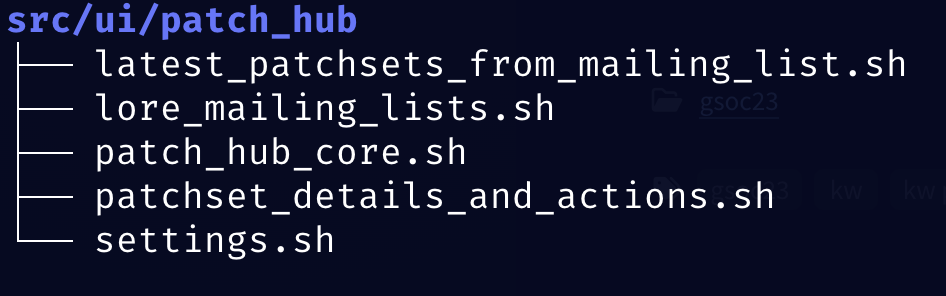
<p>For context, the kworkflow project directory structure is as follows:</p>

<p><img src="/images/kw_directory.png" alt="Picture" /></p>

<p>The goal is to copy all scripts from the <code class="language-plaintext highlighter-rouge">scripts/</code> folder, such as
<code class="language-plaintext highlighter-rouge">kw_build_cpu_scaling_monitor</code>, into the container. By creating specific
scripts and copying them to the container’s <code class="language-plaintext highlighter-rouge">/bin</code> directory, we can execute them
directly as commands.</p>

<p>With this in mind, let’s examine the script that tests the <code class="language-plaintext highlighter-rouge">--cpu-scaling</code>
feature. The main idea is to calculate the CPU usage while the <code class="language-plaintext highlighter-rouge">kw build
--cpu-scaling 50</code> command is running to check if the feature is functioning
correctly.</p>

<p>To analyze the code inside the <code class="language-plaintext highlighter-rouge">kw_build_cpu_scaling_monitor</code> script, let’s
break it down into parts.</p>

<p><strong>1. Introduction and Initial Setup</strong></p>

<p>First, we define the essential arguments and variables for the script. This
includes the <code class="language-plaintext highlighter-rouge">--cpu-scaling</code> option, which determines the percentage of CPU to be
used, and the kw build command to be monitored.</p>

<div class="language-bash highlighter-rouge"><div class="highlight"><pre class="highlight"><code><span class="c"># Check if an argument is provided</span>
<span class="k">if</span> <span class="o">[[</span> <span class="s2">"$#"</span> <span class="nt">-eq</span> 0 <span class="o">]]</span><span class="p">;</span> <span class="k">then
  </span><span class="nb">printf</span> <span class="s1">'Usage: %s &lt;cpu_scaling_value&gt;\n'</span> <span class="s2">"</span><span class="nv">$0</span><span class="s2">"</span>
  <span class="nb">exit </span>1
<span class="k">fi</span>

<span class="c"># Assign the argument to CPU_SCALING</span>
<span class="nb">declare</span> <span class="nt">-g</span> <span class="nv">CPU_SCALING</span><span class="o">=</span><span class="s2">"</span><span class="nv">$1</span><span class="s2">"</span>
<span class="nb">declare</span> <span class="nt">-g</span> <span class="nv">CPU_USAGE_FILE</span><span class="o">=</span><span class="s1">'/tmp/cpu_usage.txt'</span>
<span class="nb">declare</span> <span class="nt">-g</span> <span class="nv">KW_BUILD_CMD</span><span class="o">=</span><span class="s2">"kw build --cpu-scaling </span><span class="k">${</span><span class="nv">CPU_SCALING</span><span class="k">}</span><span class="s2">"</span>
</code></pre></div></div>

<p><strong>2. CPU Usage Monitoring</strong></p>

<p>In this section, we monitor the CPU usage during the execution of <code class="language-plaintext highlighter-rouge">kw build</code>.
We use a function that collects data from the <strong>CGROUP</strong> filesystem,
calculating the average CPU usage based on the following formula:</p>

<p><img src="/images/formula.png" alt="Picture" /></p>

<div class="language-bash highlighter-rouge"><div class="highlight"><pre class="highlight"><code><span class="k">function </span>monitor_cpu_usage<span class="o">()</span>
<span class="o">{</span>
  <span class="nb">local </span><span class="nv">cgroup_path</span><span class="o">=</span><span class="s1">'/sys/fs/cgroup/cpu.stat'</span>
  <span class="nb">local </span><span class="nv">duration</span><span class="o">=</span>30
  <span class="nb">local </span><span class="nv">interval</span><span class="o">=</span>5
  <span class="nb">local </span>end
  <span class="nb">local </span>initial_usage
  <span class="nb">local </span>final_usage
  <span class="nb">local </span>usage_diff
  <span class="nb">local </span>usage_diff_sec
  <span class="nb">local </span>cpu_count
  <span class="nb">local </span>cpu_usage_percent

  <span class="nv">end</span><span class="o">=</span><span class="k">$((</span>SECONDS <span class="o">+</span> duration<span class="k">))</span>
  <span class="k">while</span> <span class="o">[</span> <span class="nv">$SECONDS</span> <span class="nt">-lt</span> <span class="nv">$end</span> <span class="o">]</span><span class="p">;</span> <span class="k">do
    </span><span class="nv">initial_usage</span><span class="o">=</span><span class="si">$(</span><span class="nb">grep</span> <span class="s1">'usage_usec'</span> <span class="s2">"</span><span class="nv">$cgroup_path</span><span class="s2">"</span> | <span class="nb">cut</span> <span class="nt">-d</span><span class="s1">' '</span> <span class="nt">-f2</span><span class="si">)</span>
    <span class="nb">sleep</span> <span class="s2">"</span><span class="nv">$interval</span><span class="s2">"</span>
    <span class="nv">final_usage</span><span class="o">=</span><span class="si">$(</span><span class="nb">grep</span> <span class="s1">'usage_usec'</span> <span class="s2">"</span><span class="nv">$cgroup_path</span><span class="s2">"</span> | <span class="nb">cut</span> <span class="nt">-d</span><span class="s1">' '</span> <span class="nt">-f2</span><span class="si">)</span>
    <span class="nv">usage_diff</span><span class="o">=</span><span class="k">$((</span>final_usage <span class="o">-</span> initial_usage<span class="k">))</span>
    <span class="nv">usage_diff_sec</span><span class="o">=</span><span class="si">$(</span><span class="nb">printf</span> <span class="s1">'scale=6; %s / 1000000\n'</span> <span class="s2">"</span><span class="nv">$usage_diff</span><span class="s2">"</span> | bc <span class="nt">-l</span><span class="si">)</span>
    <span class="nv">cpu_count</span><span class="o">=</span><span class="si">$(</span><span class="nb">nproc</span><span class="si">)</span>
    <span class="nv">cpu_usage_percent</span><span class="o">=</span><span class="si">$(</span><span class="nb">printf</span> <span class="s1">'scale=2; (%s / (%s * %s)) * 100\n'</span> <span class="s2">"</span><span class="nv">$usage_diff_sec</span><span class="s2">"</span> <span class="s2">"</span><span class="nv">$interval</span><span class="s2">"</span> <span class="s2">"</span><span class="nv">$cpu_count</span><span class="s2">"</span> | bc <span class="nt">-l</span><span class="si">)</span>
    <span class="nb">printf</span> <span class="s1">'%s\n'</span> <span class="s2">"</span><span class="nv">$cpu_usage_percent</span><span class="s2">"</span> <span class="o">&gt;&gt;</span> <span class="s2">"</span><span class="nv">$CPU_USAGE_FILE</span><span class="s2">"</span>
  <span class="k">done</span>
<span class="o">}</span>
</code></pre></div></div>

<p><strong>3. CPU Usage Average Calculation</strong></p>

<p>Here, the <code class="language-plaintext highlighter-rouge">calculate_avg_cpu_usage()</code> function reads the collected values and
calculates the average CPU usage during the build proces</p>

<div class="language-bash highlighter-rouge"><div class="highlight"><pre class="highlight"><code><span class="k">function </span>calculate_avg_cpu_usage<span class="o">()</span>
<span class="o">{</span>
  <span class="nb">local sum</span><span class="o">=</span>0
  <span class="nb">local </span><span class="nv">count</span><span class="o">=</span>0

  <span class="k">while </span><span class="nv">IFS</span><span class="o">=</span> <span class="nb">read</span> <span class="nt">-r</span> line<span class="p">;</span> <span class="k">do
    </span><span class="nb">sum</span><span class="o">=</span><span class="si">$(</span><span class="nb">printf</span> <span class="s2">"%.6f"</span> <span class="s2">"</span><span class="si">$(</span><span class="nb">printf</span> <span class="s2">"%s + %s</span><span class="se">\n</span><span class="s2">"</span> <span class="s2">"</span><span class="nv">$sum</span><span class="s2">"</span> <span class="s2">"</span><span class="nv">$line</span><span class="s2">"</span> | bc <span class="nt">-l</span><span class="si">)</span><span class="s2">"</span><span class="si">)</span>
    <span class="nv">count</span><span class="o">=</span><span class="k">$((</span>count <span class="o">+</span> <span class="m">1</span><span class="k">))</span>
  <span class="k">done</span> &lt; <span class="s2">"</span><span class="nv">$CPU_USAGE_FILE</span><span class="s2">"</span>

  <span class="k">if</span> <span class="o">[</span> <span class="s2">"</span><span class="nv">$count</span><span class="s2">"</span> <span class="nt">-gt</span> 0 <span class="o">]</span><span class="p">;</span> <span class="k">then
    </span><span class="nv">avg</span><span class="o">=</span><span class="si">$(</span><span class="nb">printf</span> <span class="s2">"%.6f"</span> <span class="s2">"</span><span class="si">$(</span><span class="nb">printf</span> <span class="s2">"%s / %s</span><span class="se">\n</span><span class="s2">"</span> <span class="s2">"</span><span class="nv">$sum</span><span class="s2">"</span> <span class="s2">"</span><span class="nv">$count</span><span class="s2">"</span> | bc <span class="nt">-l</span><span class="si">)</span><span class="s2">"</span><span class="si">)</span>
  <span class="k">else
    </span><span class="nv">avg</span><span class="o">=</span>0
  <span class="k">fi

  </span><span class="nb">printf</span> <span class="s2">"%s</span><span class="se">\n</span><span class="s2">"</span> <span class="s2">"</span><span class="nv">$avg</span><span class="s2">"</span>
<span class="o">}</span>
</code></pre></div></div>

<p><strong>4. Verification and Validation</strong></p>

<p>In this step, we compare the average CPU usage obtained with the expected value
(in this case, 50%). It’s important to consider an acceptable error margin in
this comparison. CPU time may vary due to several factors such as warming up,
context switching, and other system activities. These variations can influence
the results, so allowing for a small margin of error helps avoid flaky tests.
If the average CPU usage falls outside this margin, the test will fail,
ensuring that we account for any variability in the CPU performance.</p>

<div class="language-bash highlighter-rouge"><div class="highlight"><pre class="highlight"><code><span class="k">function </span>check_cpu_usage<span class="o">()</span>
<span class="o">{</span>
  <span class="nb">local </span><span class="nv">avg_cpu_usage</span><span class="o">=</span><span class="s2">"</span><span class="nv">$1</span><span class="s2">"</span>
  <span class="nb">local </span><span class="nv">target_cpu_usage</span><span class="o">=</span><span class="s2">"</span><span class="nv">$CPU_SCALING</span><span class="s2">"</span>
  <span class="nb">local </span><span class="nv">threshold</span><span class="o">=</span>10
  <span class="nb">local </span>lower_bound
  <span class="nb">local </span>upper_bound

  <span class="nv">lower_bound</span><span class="o">=</span><span class="si">$(</span><span class="nb">printf</span> <span class="s2">"%.2f"</span> <span class="s2">"</span><span class="si">$(</span>bc <span class="o">&lt;&lt;&lt;</span> <span class="s2">"</span><span class="k">${</span><span class="nv">target_cpu_usage</span><span class="k">}</span><span class="s2"> - </span><span class="k">${</span><span class="nv">threshold</span><span class="k">}</span><span class="s2">"</span><span class="si">)</span><span class="s2">"</span><span class="si">)</span>
  <span class="nv">upper_bound</span><span class="o">=</span><span class="si">$(</span><span class="nb">printf</span> <span class="s2">"%.2f"</span> <span class="s2">"</span><span class="si">$(</span>bc <span class="o">&lt;&lt;&lt;</span> <span class="s2">"</span><span class="k">${</span><span class="nv">target_cpu_usage</span><span class="k">}</span><span class="s2"> + </span><span class="k">${</span><span class="nv">threshold</span><span class="k">}</span><span class="s2">"</span><span class="si">)</span><span class="s2">"</span><span class="si">)</span>

  <span class="c"># Check if the average CPU usage is outside the expected range</span>
  <span class="k">if</span> <span class="o">[[</span> <span class="si">$(</span>bc <span class="o">&lt;&lt;&lt;</span> <span class="s2">"</span><span class="k">${</span><span class="nv">avg_cpu_usage</span><span class="k">}</span><span class="s2"> &lt; </span><span class="k">${</span><span class="nv">lower_bound</span><span class="k">}</span><span class="s2">"</span><span class="si">)</span> <span class="nt">-eq</span> 1 <span class="o">||</span> <span class="si">$(</span>bc <span class="o">&lt;&lt;&lt;</span> <span class="s2">"</span><span class="k">${</span><span class="nv">avg_cpu_usage</span><span class="k">}</span><span class="s2"> &gt; </span><span class="k">${</span><span class="nv">upper_bound</span><span class="k">}</span><span class="s2">"</span><span class="si">)</span> <span class="nt">-eq</span> 1 <span class="o">]]</span><span class="p">;</span> <span class="k">then
    </span><span class="nb">exit </span>1
  <span class="k">else
    return </span>0
  <span class="k">fi</span>
<span class="o">}</span>
</code></pre></div></div>

<p><strong>5. Cancel Build Process</strong></p>

<p>To prevent the build process from continuing after monitoring, the script
terminates all related build processes using <code class="language-plaintext highlighter-rouge">pstree</code> to find all subprocesses.</p>

<div class="language-bash highlighter-rouge"><div class="highlight"><pre class="highlight"><code><span class="k">function </span>cancel_build_processes<span class="o">()</span>
<span class="o">{</span>
  <span class="nb">local </span>pids_to_kill
  <span class="nb">local </span>parent_pid
  <span class="nb">local </span>parent_pids

  <span class="c"># Using mapfile to populate parent_pids array</span>
  <span class="nb">mapfile</span> <span class="nt">-t</span> parent_pids &lt; &lt;<span class="o">(</span>pgrep <span class="nt">-f</span> <span class="s2">"</span><span class="nv">$KW_BUILD_CMD</span><span class="s2">"</span> <span class="o">||</span> <span class="nb">true</span><span class="o">)</span>

  <span class="k">for </span>parent_pid <span class="k">in</span> <span class="s2">"</span><span class="k">${</span><span class="nv">parent_pids</span><span class="p">[@]</span><span class="k">}</span><span class="s2">"</span><span class="p">;</span> <span class="k">do
    if</span> <span class="o">[</span> <span class="nt">-n</span> <span class="s2">"</span><span class="nv">$parent_pid</span><span class="s2">"</span> <span class="o">]</span><span class="p">;</span> <span class="k">then</span>
      <span class="c"># Using read with IFS to populate pids_to_kill array</span>
      <span class="nv">IFS</span><span class="o">=</span><span class="s1">' '</span> <span class="nb">read</span> <span class="nt">-r</span> <span class="nt">-a</span> pids_to_kill <span class="o">&lt;&lt;&lt;</span> <span class="s2">"</span><span class="si">$(</span>pstree <span class="nt">-p</span> <span class="s2">"</span><span class="nv">$parent_pid</span><span class="s2">"</span> | <span class="nb">grep</span> <span class="nt">-o</span> <span class="s1">'([0-9]\+)'</span> | <span class="nb">grep</span> <span class="nt">-o</span> <span class="s1">'[0-9]\+'</span><span class="si">)</span><span class="s2">"</span>

      <span class="nb">printf</span> <span class="s2">"Cancelling PIDs: %s</span><span class="se">\n</span><span class="s2">"</span> <span class="s2">"</span><span class="k">${</span><span class="nv">pids_to_kill</span><span class="p">[@]</span><span class="k">}</span><span class="s2">"</span>
      <span class="nb">printf</span> <span class="s2">"%s</span><span class="se">\n</span><span class="s2">"</span> <span class="s2">"</span><span class="k">${</span><span class="nv">pids_to_kill</span><span class="p">[@]</span><span class="k">}</span><span class="s2">"</span> | xargs <span class="nb">kill</span> <span class="nt">-9</span>
    <span class="k">fi
  done</span>
<span class="o">}</span>
</code></pre></div></div>

<p><strong>6. Script Execution</strong></p>

<p>Finally, the script runs the kw build command in the background, monitors CPU
usage, calculates the average, checks if it is within the error margin, and
cancels processes at the end.</p>

<div class="language-bash highlighter-rouge"><div class="highlight"><pre class="highlight"><code><span class="c"># Start the build command in the background</span>
<span class="nb">eval</span> <span class="s2">"</span><span class="nv">$KW_BUILD_CMD</span><span class="s2">"</span> &amp;
<span class="c"># Wait a short period to ensure the kw build process is running</span>
<span class="nb">sleep </span>30
<span class="c"># Monitor CPU usage while the process is running</span>
monitor_cpu_usage
<span class="c"># Cancel the build processes and their subprocesses</span>
cancel_build_processes
<span class="c"># Calculate the average CPU usage</span>
<span class="nv">avg_cpu_usage</span><span class="o">=</span><span class="si">$(</span>calculate_avg_cpu_usage<span class="si">)</span>
<span class="nb">printf</span> <span class="s2">"Average CPU usage during build: %.2f%%</span><span class="se">\n</span><span class="s2">"</span> <span class="s2">"</span><span class="nv">$avg_cpu_usage</span><span class="s2">"</span>
<span class="c"># Check if the average CPU usage is within the expected range</span>
check_cpu_usage <span class="s2">"</span><span class="nv">$avg_cpu_usage</span><span class="s2">"</span>
<span class="c"># Clean up the CPU usage file</span>
<span class="nb">rm</span> <span class="nv">$CPU_USAGE_FILE</span>
</code></pre></div></div>

<h3 id="validating-the-workflow-with-assert_equals_helper">Validating the workflow with assert_equals_helper</h3>

<p>Returning to our cpu-scaling option test function:</p>

<div class="language-bash highlighter-rouge"><div class="highlight"><pre class="highlight"><code><span class="k">function </span>test_kernel_build_cpu_scaling_option<span class="o">()</span>
<span class="o">{</span>
  <span class="nb">local </span>build_status
  <span class="nb">local </span>build_result
  <span class="nb">local </span>build_status_log
  <span class="nb">local </span><span class="nv">cpu_scaling_percentage</span><span class="o">=</span>50

  container_exec <span class="s2">"</span><span class="nv">$CONTAINER</span><span class="s2">"</span> <span class="s2">"cd </span><span class="k">${</span><span class="nv">KERNEL_TREE_PATH_CONTAINER</span><span class="k">}</span><span class="s2"> &amp;&amp; kw_build_cpu_scaling_monitor </span><span class="k">${</span><span class="nv">cpu_scaling_percentage</span><span class="k">}</span><span class="s2"> &gt; /dev/null 2&gt;&amp;1"</span>
  assert_equals_helper <span class="s2">"kw build --cpu-scaling 50 failed for </span><span class="k">${</span><span class="nv">CONTAINER</span><span class="k">}</span><span class="s2">"</span> <span class="s2">"(</span><span class="k">${</span><span class="nv">LINENO</span><span class="k">}</span><span class="s2">)"</span> 0 <span class="s2">"</span><span class="nv">$?</span><span class="s2">"</span>
<span class="o">}</span>
</code></pre></div></div>

<p>The test runs inside a container, where the script monitors CPU usage while <code class="language-plaintext highlighter-rouge">kw
build --cpu-scaling 50</code> is executed. The <code class="language-plaintext highlighter-rouge">check_cpu_usage</code> function compares
the average CPU usage with the expected value and, based on this, returns 0
(<strong>success</strong>) or 1 (<strong>failure</strong>). The result is then verified by
<code class="language-plaintext highlighter-rouge">assert_equals_helper</code>, ensuring that the behavior is as expected.</p>

<p>With this, we conclude the validation of the CPU scaling feature. If the
<code class="language-plaintext highlighter-rouge">check_cpu_usage()</code> function returns 0, the test is considered successful,
validating that the CPU scaling functionality of kw build is working correctly.</p>

<h1 id="conclusion">Conclusion</h1>

<p><code class="language-plaintext highlighter-rouge">kw build</code> is one of the core features of <code class="language-plaintext highlighter-rouge">kw</code>, so integration testing for it is
crucial to ensure the tool’s robustness and reliability, especially when
dealing with different environments and various configuration options. The
adoption of <strong>Podman</strong> Containers and the <strong>shUnit2</strong> framework allowed for a
structured and efficient approach to these tests. Additionally, optimizing the
testing environment and rigorously checking results ensure that <code class="language-plaintext highlighter-rouge">kw build</code>
continues to function as expected, even under varying conditions. Adjusting the
test execution strategy to reduce time and resource consumption was a critical
decision for the project.</p>

<p>Furthermore, the foundational work on the infrastructure for testing <code class="language-plaintext highlighter-rouge">kw build</code>
has been laid. This will facilitate future expansions of the testing suite,
making it easier to test other feature workflows and ensure comprehensive
coverage across the tool.</p>]]></content><author><name>Aquila Macedo</name></author><category term="kw" /><category term="gsoc" /><category term="integration_testing" /><category term="kw-build" /><summary type="html"><![CDATA[The kw build command is a versatile tool that encompasses everything related to building and managing Linux kernel images. It supports various options, such as displaying build information, invoking kernel menuconfig, enabling ccache, adjusting CPU usage during compilation, saving logs, and using the LLVM toolchain. Additionally, it provides options for cleaning the build environment, customizing CFLAGS, and compiling specific commits. The command also offers alert notifications and verbose mode for detailed debugging information.]]></summary></entry><entry><title type="html">Integration Testing for kw ssh</title><link href="/integration-for-kw-ssh/" rel="alternate" type="text/html" title="Integration Testing for kw ssh" /><published>2024-07-30T10:30:00+00:00</published><updated>2024-07-30T10:30:00+00:00</updated><id>/integration-for-kw-ssh</id><content type="html" xml:base="/integration-for-kw-ssh/"><![CDATA[<p><code class="language-plaintext highlighter-rouge">kw-ssh</code> is a feature in kworkflow that simplifies remote access to machines
via SSH. It allows you to execute commands or bash scripts on a remote machine
easily. Additionally, this feature supports file and directory transfer between
local and remote machines.</p>

<p>This post aims to show what happens behind the scenes in testing a typical <code class="language-plaintext highlighter-rouge">kw</code>
feature. It provides a clear view of the challenges and solutions involved in
the integration process, helping to understand how <code class="language-plaintext highlighter-rouge">kw ssh</code> and similar
features are tested and refined.</p>

<h1 id="overview-of-kw-ssh-testing-architecture">Overview of kw-ssh Testing Architecture</h1>

<p><img src="/images/kw-ssh-illustration.png" alt="Picture" /></p>

<p>This image illustrates the structure of the integration tests for the <code class="language-plaintext highlighter-rouge">kw-ssh</code>
feature, using containers to simulate different operating system environments.
This setup involves one container acting as the test environment, within which
tests are executed across three Linux distributions: <strong>Debian</strong>, <strong>Fedora</strong>,
and <strong>Archlinux</strong>.</p>

<p>Within this test environment, there is a second container, represented in the
image as “nested” which hosts the SSH server needed for the tests. This
configuration allows for the isolation of the test environment and execution of
<code class="language-plaintext highlighter-rouge">kw-ssh</code> commands on a simulated SSH server, without affecting the local system
or other containers.</p>

<p>By using containers for each Linux environment and for the SSH server, we
ensure that tests are conducted in controlled environments, avoiding
contamination between tests and maintaining result consistency. This approach
allows the functionality of <code class="language-plaintext highlighter-rouge">kw-ssh</code> to be validated across different
distributions, ensuring the code performs as expected on various platforms.</p>

<h1 id="details-of-the-testing-environment">Details of the Testing Environment</h1>

<p>Inside the container that serves as the test environment, I copy a file from
the host machine, which is the <code class="language-plaintext highlighter-rouge">Containerfile</code> responsible for generating the
container with the SSH server. This SSH container is essential for enabling
connection tests using <code class="language-plaintext highlighter-rouge">kw-ssh</code>, ensuring that the authentication and transfer
processes work correctly.</p>

<div class="language-bash highlighter-rouge"><div class="highlight"><pre class="highlight"><code><span class="c"># This Containerfile sets up a Debian-based container with an SSH server. The</span>
<span class="c"># purpose of this container is to test SSH connections using the kw ssh tool.</span>
<span class="c"># It installs necessary packages, configures the SSH server, and sets up root</span>
<span class="c"># login with a pre-defined password and SSH public key authentication.</span>

<span class="c"># Start with the Debian image</span>
FROM debian:latest

<span class="c"># Install necessary packages</span>
RUN apt-get update <span class="o">&amp;&amp;</span> <span class="se">\</span>
    apt-get <span class="nb">install</span> <span class="nt">-y</span> openssh-server iptables rsync <span class="o">&amp;&amp;</span> <span class="se">\</span>
    <span class="nb">mkdir</span> <span class="nt">-p</span> /var/run/sshd <span class="o">&amp;&amp;</span> <span class="se">\</span>
    <span class="nb">echo</span> <span class="s1">'root:password'</span> | chpasswd <span class="o">&amp;&amp;</span> <span class="se">\</span>
    <span class="nb">sed</span> <span class="nt">-i</span> <span class="s1">'s/#PermitRootLogin prohibit-password/PermitRootLogin yes/'</span> /etc/ssh/sshd_config <span class="o">&amp;&amp;</span> <span class="se">\</span>
    <span class="nb">sed</span> <span class="nt">-i</span> <span class="s1">'s/UsePAM yes/UsePAM no/'</span> /etc/ssh/sshd_config <span class="o">&amp;&amp;</span> <span class="se">\</span>
    <span class="nb">mkdir</span> <span class="nt">-p</span> /root/.ssh <span class="o">&amp;&amp;</span> <span class="se">\</span>
    <span class="nb">chmod </span>700 /root/.ssh

<span class="c"># Copy SSH public key and set permissions</span>
COPY id_rsa.pub /root/.ssh/authorized_keys
RUN <span class="nb">chmod </span>600 /root/.ssh/authorized_keys

<span class="c"># Expose the SSH port</span>
EXPOSE 22

<span class="c"># Start the SSH service</span>
CMD <span class="o">[</span><span class="s2">"/usr/sbin/sshd"</span>, <span class="s2">"-D"</span><span class="o">]</span>
</code></pre></div></div>

<h1 id="challenges-with-nested-containers">Challenges with Nested Containers</h1>

<p>When creating containers within containers, executing commands directly from
the host machine to the nested container becomes a challenge. To address this
complexity, I developed the <code class="language-plaintext highlighter-rouge">container_exec_in_nested_container()</code> function,
which facilitates command execution within this nested environment.</p>

<div class="language-bash highlighter-rouge"><div class="highlight"><pre class="highlight"><code><span class="c"># Function to execute a command within a container that is itself running</span>
<span class="c"># inside another container.</span>
<span class="c">#</span>
<span class="c">#  @outer_container_name     The name or ID of the outer container.</span>
<span class="c">#  @inner_container_name     The name or ID of the inner container.</span>
<span class="c">#  @inner_container_command  The command to be executed within the inner container.</span>
<span class="c">#  @podman_exec_options      Extra parameters for 'podman container exec' like</span>
<span class="c">#                            --workdir, --env, and other supported options.</span>
<span class="k">function </span>container_exec_in_nested_container<span class="o">()</span>
<span class="o">{</span>
  <span class="nb">local </span><span class="nv">outer_container_name</span><span class="o">=</span><span class="s2">"</span><span class="nv">$1</span><span class="s2">"</span>
  <span class="nb">local </span><span class="nv">inner_container_name</span><span class="o">=</span><span class="s2">"</span><span class="nv">$2</span><span class="s2">"</span>
  <span class="nb">local </span><span class="nv">inner_container_command</span><span class="o">=</span><span class="s2">"</span><span class="nv">$3</span><span class="s2">"</span>
  <span class="nb">local </span><span class="nv">podman_exec_options</span><span class="o">=</span><span class="s2">"</span><span class="nv">$4</span><span class="s2">"</span>
  <span class="nb">local </span><span class="nv">cmd</span><span class="o">=</span><span class="s1">'podman container exec'</span>

  <span class="k">if</span> <span class="o">[[</span> <span class="nt">-n</span> <span class="s2">"</span><span class="nv">$podman_exec_options</span><span class="s2">"</span> <span class="o">]]</span><span class="p">;</span> <span class="k">then
    </span>cmd+<span class="o">=</span><span class="s2">" </span><span class="k">${</span><span class="nv">podman_exec_options</span><span class="k">}</span><span class="s2">"</span>
  <span class="k">fi

  </span><span class="nv">inner_container_command</span><span class="o">=</span><span class="si">$(</span>str_escape_single_quotes <span class="s2">"</span><span class="nv">$inner_container_command</span><span class="s2">"</span><span class="si">)</span>
  cmd+<span class="o">=</span><span class="s2">" </span><span class="k">${</span><span class="nv">inner_container_name</span><span class="k">}</span><span class="s2"> /bin/bash -c </span><span class="nv">$'</span><span class="k">${</span><span class="nv">inner_container_command</span><span class="k">}</span><span class="s2">'"</span>

  <span class="nv">output</span><span class="o">=</span><span class="si">$(</span>container_exec <span class="s2">"</span><span class="nv">$outer_container_name</span><span class="s2">"</span> <span class="s2">"</span><span class="nv">$cmd</span><span class="s2">"</span><span class="si">)</span>

  <span class="k">if</span> <span class="o">[[</span> <span class="s2">"</span><span class="nv">$?</span><span class="s2">"</span> <span class="nt">-ne</span> 0 <span class="o">]]</span><span class="p">;</span> <span class="k">then
    </span>fail <span class="s2">"(</span><span class="k">${</span><span class="nv">LINENO</span><span class="k">}</span><span class="s2">): failed to execute the command in the container."</span>
  <span class="k">fi

  </span><span class="nb">printf</span> <span class="s1">'%s\n'</span> <span class="s2">"</span><span class="nv">$output</span><span class="s2">"</span>
<span class="o">}</span>
</code></pre></div></div>

<p>This function facilitates the execution of commands in a nested container
within another container, which is common in kw-ssh integration tests. It uses
the <code class="language-plaintext highlighter-rouge">container_exec()</code> function, which executes commands directly in a
container. One of the challenges when passing commands to containers is
handling special characters, such as single quotes, which, in Bash, can cause a
lot of obscure issues during execution. To address this, I used the
<code class="language-plaintext highlighter-rouge">str_escape_single_quotes()</code> function, which correctly escapes these
characters, ensuring that commands are executed reliably.</p>

<h1 id="managing-commands-in-nested-containers">Managing Commands in Nested Containers</h1>

<p>The <code class="language-plaintext highlighter-rouge">str_escape_single_quotes()</code> function uses the <strong>sed</strong> command to add
backslashes <code class="language-plaintext highlighter-rouge">(\)</code> before any single quotes found in the string, allowing
commands containing single quotes to be interpreted correctly by the shell:</p>

<div class="language-bash highlighter-rouge"><div class="highlight"><pre class="highlight"><code><span class="c"># Escape (i.e. adds a '\' before) all single quotes. This is useful when we want</span>
<span class="c"># to make sure that a single quote `'` is interpreted as a literal in character</span>
<span class="c"># sequences like $'&lt;string&gt;'. For reference, see section 3.1.2.4 of</span>
<span class="c"># https://www.gnu.org/software/bash/manual/bash.html#Shell-Syntax.</span>
<span class="c">#</span>
<span class="c"># @string: String to be processed</span>
<span class="c">#</span>
<span class="c"># Return:</span>
<span class="c"># Returns the string with all single quotes escaped, if any, or 22 (EINVAL) if</span>
<span class="c"># the string is empty.</span>
<span class="k">function </span>str_escape_single_quotes<span class="o">()</span>
<span class="o">{</span>
  <span class="nb">local </span><span class="nv">string</span><span class="o">=</span><span class="s2">"</span><span class="nv">$1</span><span class="s2">"</span>

  <span class="o">[[</span> <span class="nt">-z</span> <span class="s2">"</span><span class="nv">$string</span><span class="s2">"</span> <span class="o">]]</span> <span class="o">&amp;&amp;</span> <span class="k">return </span>22 <span class="c"># EINVAL</span>

  <span class="nb">printf</span> <span class="s1">'%s'</span> <span class="s2">"</span><span class="nv">$string</span><span class="s2">"</span> | <span class="nb">sed</span> <span class="s2">"s/'/</span><span class="se">\\\'</span><span class="s2">/g"</span>
<span class="o">}</span>
</code></pre></div></div>

<p>Additionally, in the <code class="language-plaintext highlighter-rouge">container_exec_in_nested_container()</code> function, I use the
Special <code class="language-plaintext highlighter-rouge">$''</code> format for strings, known as <a href="https://www.gnu.org/software/bash/manual/bash.html#ANSI_002dC-Quoting">ANSI C
Quoting</a>.
This format allows escape sequences such as <code class="language-plaintext highlighter-rouge">\'</code> (escaped single quotes) to be
processed correctly by the shell. The use of <code class="language-plaintext highlighter-rouge">$''</code> is essential here to ensure
that commands are interpreted correctly, even when they contain characters that
would otherwise need to be escaped. This prevents errors when running tests.</p>

<p>Here’s an example of how this approach is implemented:</p>

<div class="language-bash highlighter-rouge"><div class="highlight"><pre class="highlight"><code>cmd+<span class="o">=</span><span class="s2">" </span><span class="k">${</span><span class="nv">inner_container_name</span><span class="k">}</span><span class="s2"> /bin/bash -c </span><span class="nv">$'</span><span class="k">${</span><span class="nv">inner_container_command</span><span class="k">}</span><span class="s2">'"</span>
</code></pre></div></div>
<p>By using <code class="language-plaintext highlighter-rouge">$''</code>, the string passed to the container can contain special
characters without causing problems at runtime. This is especially important
when working with nested containers, where proper string handling is critical
to the success of integration tests.</p>

<h1 id="integration-test-example-with-kw-ssh">Integration Test Example with kw-ssh</h1>

<div class="language-bash highlighter-rouge"><div class="highlight"><pre class="highlight"><code><span class="c"># This function tests the SSH connection functionality using a remote global</span>
<span class="c"># configuration file. It ensures that the 'kw ssh' command can establish a</span>
<span class="c"># connection to an SSH server and execute a command.</span>
<span class="k">function </span>test_kw_ssh_connection_remote_global_config_file<span class="o">()</span>
<span class="o">{</span>
  <span class="nb">local </span><span class="nv">expected_output</span><span class="o">=</span><span class="s1">'Connection successful'</span>
  <span class="nb">local </span>ssh_container_ip_address
  <span class="nb">local </span>distro
  <span class="nb">local </span>container
  <span class="nb">local </span>output

  <span class="k">for </span>distro <span class="k">in</span> <span class="s2">"</span><span class="k">${</span><span class="nv">DISTROS</span><span class="p">[@]</span><span class="k">}</span><span class="s2">"</span><span class="p">;</span> <span class="k">do
    </span><span class="nv">container</span><span class="o">=</span><span class="s2">"kw-</span><span class="k">${</span><span class="nv">distro</span><span class="k">}</span><span class="s2">"</span>
    <span class="c"># Get the IP address of the ssh container</span>
    <span class="nv">ssh_container_ip_address</span><span class="o">=</span><span class="si">$(</span>container_exec_in_nested_container <span class="s2">"</span><span class="nv">$container</span><span class="s2">"</span> <span class="s2">"</span><span class="nv">$SSH_CONTAINER_NAME</span><span class="s2">"</span> <span class="s1">'hostname --all-ip-addresses'</span> | xargs<span class="si">)</span>

    <span class="c"># Update the global config file with the correct IP address of the SSH server</span>
    container_exec <span class="s2">"</span><span class="nv">$container</span><span class="s2">"</span> <span class="s2">"sed --in-place </span><span class="se">\"</span><span class="s2">s/localhost/</span><span class="k">${</span><span class="nv">ssh_container_ip_address</span><span class="k">}</span><span class="s2">/</span><span class="se">\"</span><span class="s2"> </span><span class="k">${</span><span class="nv">KW_GLOBAL_CONFIG_FILE</span><span class="k">}</span><span class="s2">"</span>
    <span class="nv">output</span><span class="o">=</span><span class="si">$(</span>container_exec <span class="s2">"</span><span class="nv">$container</span><span class="s2">"</span> <span class="s1">'kw ssh --command "echo Connection successful"'</span><span class="si">)</span>
    assert_equals_helper <span class="s2">"kw ssh connection failed for </span><span class="k">${</span><span class="nv">distro</span><span class="k">}</span><span class="s2">"</span> <span class="s2">"</span><span class="nv">$LINENO</span><span class="s2">"</span> <span class="s2">"</span><span class="nv">$expected_output</span><span class="s2">"</span> <span class="s2">"</span><span class="nv">$output</span><span class="s2">"</span>
  <span class="k">done</span>
<span class="o">}</span>
</code></pre></div></div>

<p>This test example verifies the SSH connection of <code class="language-plaintext highlighter-rouge">kw ssh</code> using the remote
connections configuration file. Typically, this file can be found at
<em>~/.config/kw/remote.config</em>. This test illustrates how the
<code class="language-plaintext highlighter-rouge">container_exec_in_nested_container()</code> function is used to manage command
execution in nested containers and how the test is conducted across different
Linux distributions.</p>

<h1 id="conclusion">Conclusion</h1>

<p>Integration tests for kw-ssh ensure that the feature works correctly across
different Linux distributions. With the isolation of test environments from
containers in conjunction with an SSH server, we achieve precise and consistent
validation. The functions developed to manage nested containers and handle
special characters ensure that commands are executed without issues.</p>

<p>This approach provides confidence in the functionality of <code class="language-plaintext highlighter-rouge">kw-ssh</code>, ensuring it
performs as expected in various scenarios.</p>]]></content><author><name>Aquila Macedo</name></author><category term="kw" /><category term="gsoc" /><category term="integration_testing" /><category term="kw-ssh" /><summary type="html"><![CDATA[kw-ssh is a feature in kworkflow that simplifies remote access to machines via SSH. It allows you to execute commands or bash scripts on a remote machine easily. Additionally, this feature supports file and directory transfer between local and remote machines.]]></summary></entry><entry><title type="html">Introduction to Integration Testing in kworkflow</title><link href="/introduction-to-integration-testing/" rel="alternate" type="text/html" title="Introduction to Integration Testing in kworkflow" /><published>2024-06-26T18:27:23+00:00</published><updated>2024-06-26T18:27:23+00:00</updated><id>/introduction-to-integration-testing</id><content type="html" xml:base="/introduction-to-integration-testing/"><![CDATA[<p>Integration tests are designed to verify that different modules of a system
work together as expected. They ensure that the interaction between components
occurs seamlessly and that the system functions correctly as a whole.</p>

<h1 id="using-shunit2-in-integration-tests">Using shUnit2 in Integration Tests??</h1>

<p>Originally, <a href="https://github.com/kward/shunit2">shUnit2</a> was created for unit
testing shell scripts, providing a framework to validate shell functions and
commands in isolation. Its main features include <code class="language-plaintext highlighter-rouge">oneTimeSetUp()</code> for setup
tasks before running tests, and <code class="language-plaintext highlighter-rouge">oneTimeTearDown()</code> for actions after all
tests. Methods like <code class="language-plaintext highlighter-rouge">setUp()</code> and <code class="language-plaintext highlighter-rouge">tearDown()</code> configure and clean up the
environment before and after each test. Although shUnit2’s primary focus is
unit testing (hence the ‘Unit’ in ‘shUnit2’), its flexibility has proven useful
for integration testing as well.</p>

<h1 id="a-brief-overview">A Brief Overview</h1>

<p>In my Google Summer of Code 2024 (GSoC24) project, as detailed in a <a href="/got-accepted-into-gsoc/">previous
post</a>, I am developing integration tests
for the kworkflow project. To facilitate this, It was introduced the
<code class="language-plaintext highlighter-rouge">--integration</code> option in the test script:</p>

<div class="language-plaintext highlighter-rouge"><div class="highlight"><pre class="highlight"><code>./run_tests.sh --integration
</code></pre></div></div>

<p>These integration tests run in isolated environments using Podman containers,
each configured with different Linux distributions: <strong>Debian</strong>, <strong>Fedora</strong>,
<strong>Archlinux</strong>. These three were chosen because they cover a lot of what people
use in the Linux world. Debian is very stable and widely used, and many other
distributions are based on it, like <strong>Ubuntu</strong>. This makes Debian a great
choice for testing in environments that are common across many different
setups. Fedora is more about using the latest technology, which helps us test
in newer, more experimental environments. Archlinux is known for always having
the latest versions of software and being very customizable, allowing us to
test in flexible setups. By testing on all three, we ensure our software works
well across a wide range of Linux distributions.</p>

<p>Here’s a closer look at how the process works:</p>

<ol>
  <li>
    <p><strong>Container Image Building</strong>:  Initially, container images are constructed
for each supported distribution. These images are built in layers, starting
with a base layer from <strong>Docker Hub</strong>, which provides the core operating system
environment. On top of this base layer, additional layers are added to install
<code class="language-plaintext highlighter-rouge">kw</code> dependencies and the <code class="language-plaintext highlighter-rouge">kw</code> itself. This process ensures that all required
components are available in the container. After building the images, each test
suite customizes the container environment as needed for specific tests. This
layered approach allows for efficient and consistent setup of the test
environments.</p>
  </li>
  <li>
    <p><strong>Test Execution</strong>: In this step, commands are executed within the
containers to simulate real user interactions with <code class="language-plaintext highlighter-rouge">kw</code>, unlike unit tests
that focus on individual functions. Assertions are then made to verify that
<code class="language-plaintext highlighter-rouge">kw</code> performs correctly across various Linux platforms. Each test is run in a
fresh container environment to ensure a clean state and prevent any
interference from previous tests.</p>
  </li>
</ol>

<p><strong>Initial Execution Time</strong>: The first execution of these integration tests may
take more than 10 minutes. This delay is due to the time required for Podman to
fetch the base images (if not already cached), build the container images and
install the necessary kworkflow dependencies on each distribution. Subsequent
test runs will be significantly faster because of the caching mechanism that
speeds up the container build process.</p>

<p>Here’s a snippet from the <code class="language-plaintext highlighter-rouge">tests/integration/utils.sh</code> script illustrating how
containers are started after the images are built:</p>

<div class="language-bash highlighter-rouge"><div class="highlight"><pre class="highlight"><code><span class="c"># Podman containers are isolated environments designed to run a single</span>
<span class="c"># process. After the process ends, the container is destroyed. In order to</span>
<span class="c"># execute multiple commands in the container, we need to keep the</span>
<span class="c"># container alive, which means that the primary process must not terminate.</span>
<span class="c"># Therefore, we run a never-ending command as the primary process, so that</span>
<span class="c"># we can execute multiple commands (secondary processes) and get the output</span>
<span class="c"># of each of them separately.</span>
container_run <span class="se">\</span>
  <span class="nt">--workdir</span> <span class="s2">"</span><span class="k">${</span><span class="nv">working_directory</span><span class="k">}</span><span class="s2">"</span> <span class="se">\</span>
  <span class="nt">--volume</span> <span class="s2">"</span><span class="k">${</span><span class="nv">KWROOT_DIR</span><span class="k">}</span><span class="s2">"</span>:<span class="s2">"</span><span class="k">${</span><span class="nv">working_directory</span><span class="k">}</span><span class="s2">:Z"</span> <span class="se">\</span>
  <span class="nt">--env</span> <span class="nv">PATH</span><span class="o">=</span><span class="s1">'/root/.local/bin:/usr/bin'</span> <span class="se">\</span>
  <span class="nt">--name</span> <span class="s2">"</span><span class="k">${</span><span class="nv">container_name</span><span class="k">}</span><span class="s2">"</span> <span class="se">\</span>
  <span class="nt">--privileged</span> <span class="se">\</span>
  <span class="nt">--detach</span> <span class="se">\</span>
  <span class="s2">"</span><span class="k">${</span><span class="nv">container_img</span><span class="k">}</span><span class="s2">"</span> <span class="nb">sleep </span>infinity <span class="o">&gt;</span> /dev/null

<span class="k">if</span> <span class="o">[[</span> <span class="s2">"</span><span class="nv">$?</span><span class="s2">"</span> <span class="nt">-ne</span> 0 <span class="o">]]</span><span class="p">;</span> <span class="k">then
  </span>fail <span class="s2">"(</span><span class="k">${</span><span class="nv">LINENO</span><span class="k">}</span><span class="s2">): Failed to run the container </span><span class="k">${</span><span class="nv">container_name</span><span class="k">}</span><span class="s2">"</span>
<span class="k">fi</span>

<span class="c"># Container images already have kw installed. Install it again, overwriting</span>
<span class="c"># the installation.</span>
container_exec <span class="s2">"</span><span class="k">${</span><span class="nv">container_name</span><span class="k">}</span><span class="s2">"</span> <span class="s1">'./setup.sh --install --force --skip-checks --skip-docs &gt; /dev/null 2&gt;&amp;1'</span>

<span class="k">if</span> <span class="o">[[</span> <span class="s2">"</span><span class="nv">$?</span><span class="s2">"</span> <span class="nt">-ne</span> 0 <span class="o">]]</span><span class="p">;</span> <span class="k">then
  </span>fail <span class="s2">"(</span><span class="k">${</span><span class="nv">LINENO</span><span class="k">}</span><span class="s2">): Failed to install kw in the container </span><span class="k">${</span><span class="nv">container_name</span><span class="k">}</span><span class="s2">"</span>
<span class="k">else
  </span>distros_ok+<span class="o">=(</span><span class="s2">"</span><span class="nv">$distro</span><span class="s2">"</span><span class="o">)</span>
<span class="k">fi

done</span>
</code></pre></div></div>

<p>The <code class="language-plaintext highlighter-rouge">container_run()</code> function is essential for setting up the test environment
within the Podman container. It ensures that the container remains active,
allowing multiple commands to be executed sequentially. Normally, a Podman
container is designed to run a single process and terminate when that process
ends. However, to perform a series of operations in a single container session,
<code class="language-plaintext highlighter-rouge">container_run()</code> initiates a never-ending command, such as <code class="language-plaintext highlighter-rouge">sleep infinity</code>,
as the primary process. This keeps the container alive and ready for further
commands, making it an ideal setup for integration testing.</p>

<p>In this context, the <code class="language-plaintext highlighter-rouge">container_exec()</code> function is crucial for installing the
kworkflow binary within the container. It ensures that the installation uses
the latest version of the project available in the current execution
environment. This approach guarantees that the tests are performed with the
current state of the repository, i.e., the kw version we wish to test.</p>

<p>Here’s how the <code class="language-plaintext highlighter-rouge">container_exec()</code> function works:</p>

<div class="language-bash highlighter-rouge"><div class="highlight"><pre class="highlight"><code><span class="c"># Execute a command within a container.</span>
<span class="c">#</span>
<span class="c"># @container_name       The name or ID of the target container.</span>
<span class="c"># @container_command    The command to be executed within the container.</span>
<span class="c"># @podman_exec_options  Extra parameters for 'podman container exec' like</span>
<span class="c">#                       --workdir, --env, and other supported options.</span>
<span class="k">function </span>container_exec<span class="o">()</span>
<span class="o">{</span>
  <span class="nb">local </span><span class="nv">container_name</span><span class="o">=</span><span class="s2">"</span><span class="nv">$1</span><span class="s2">"</span>
  <span class="nb">local </span><span class="nv">container_command</span><span class="o">=</span><span class="s2">"</span><span class="nv">$2</span><span class="s2">"</span>
  <span class="nb">local </span><span class="nv">podman_exec_options</span><span class="o">=</span><span class="s2">"</span><span class="nv">$3</span><span class="s2">"</span>
  <span class="nb">local </span><span class="nv">cmd</span><span class="o">=</span><span class="s1">'podman container exec'</span>

  <span class="k">if</span> <span class="o">[[</span> <span class="nt">-n</span> <span class="s2">"</span><span class="nv">$podman_exec_options</span><span class="s2">"</span> <span class="o">]]</span><span class="p">;</span> <span class="k">then
    </span>cmd+<span class="o">=</span><span class="s2">" </span><span class="k">${</span><span class="nv">podman_exec_options</span><span class="k">}</span><span class="s2">"</span>
  <span class="k">fi</span>

  <span class="c"># Escape single quotes in the container command</span>
  <span class="nv">container_command</span><span class="o">=</span><span class="si">$(</span>str_escape_single_quotes <span class="s2">"</span><span class="nv">$container_command</span><span class="s2">"</span><span class="si">)</span>

  cmd+<span class="o">=</span><span class="s2">" </span><span class="k">${</span><span class="nv">container_name</span><span class="k">}</span><span class="s2"> /bin/bash -c </span><span class="nv">$'</span><span class="k">${</span><span class="nv">container_command</span><span class="k">}</span><span class="s2">' 2&gt; /dev/null"</span>

  <span class="nb">eval</span> <span class="s2">"</span><span class="nv">$cmd</span><span class="s2">"</span>

  <span class="k">if</span> <span class="o">[[</span> <span class="s2">"</span><span class="nv">$?</span><span class="s2">"</span> <span class="nt">-ne</span> 0 <span class="o">]]</span><span class="p">;</span> <span class="k">then
    </span>complain <span class="s2">"</span><span class="nv">$cmd</span><span class="s2">"</span>
    fail <span class="s2">"(</span><span class="k">${</span><span class="nv">LINENO</span><span class="k">}</span><span class="s2">): Failed to execute the command in the container."</span>
  <span class="k">fi</span>
<span class="o">}</span>
</code></pre></div></div>

<p>This is one of the most crucial functions in the <code class="language-plaintext highlighter-rouge">tests/integration/utils.sh</code>
file for integration tests. It enables the execution of commands directly
within the test environment container, which is highly useful for managing and
validating operations during the tests.</p>

<h1 id="performance-considerations">Performance Considerations</h1>

<p>The <code class="language-plaintext highlighter-rouge">kw build</code> command is particularly important in this context, as it can be
quite time-consuming, especially when kernel compilation is involved (<code class="language-plaintext highlighter-rouge">kw
build</code> does much more than just compilation). One solution under consideration
is to run integration tests on just one randomly selected Linux distribution.
Running the same tests across all three supported distributions (<strong>Debian</strong>,
<strong>Fedora</strong>, and <strong>Archlinux</strong>) would significantly increase the overall testing
time.</p>

<p>A future improvement in the CI pipeline could involve identifying which files
were modified in the commits and executing only the relevant integration tests
based on those changes. For instance, if the <code class="language-plaintext highlighter-rouge">src/build.sh</code> file is altered in a
commit, the CI should trigger the kw build command.</p>

<p>This approach would ensure that integration tests are more efficient, running
only what is necessary based on the specific changes made to the code.</p>

<h1 id="conclusion">Conclusion</h1>

<p>The integration testing process for kworkflow, as outlined, ensures that kw
functions correctly across different environments. By leveraging Podman
containers and a systematic approach to building and testing, we can achieve
reliable and consistent results, verifying that kworkflow integrates smoothly
with various Linux distributions.</p>]]></content><author><name>Aquila Macedo</name></author><category term="kw" /><category term="gsoc" /><category term="integration_testing" /><summary type="html"><![CDATA[Integration tests are designed to verify that different modules of a system work together as expected. They ensure that the interaction between components occurs seamlessly and that the system functions correctly as a whole.]]></summary></entry><entry><title type="html">Accepted to Google Summer of Code 2024</title><link href="/got-accepted-into-gsoc/" rel="alternate" type="text/html" title="Accepted to Google Summer of Code 2024" /><published>2024-05-03T10:30:08+00:00</published><updated>2024-05-03T10:30:08+00:00</updated><id>/got-accepted-into-gsoc</id><content type="html" xml:base="/got-accepted-into-gsoc/"><![CDATA[<p>In the final moments of the MiniDebconf in Belo Horizonte that I attended back
in April, as I was heading to the airport to go back home, a notification
popped up on my phone: I had been accepted into Google Summer of Code 2024. It
was a surreal and incredibly exciting moment.</p>

<h6 id="snapshot-minidebconf-belo-horizonte-2024">Snapshot: MiniDebconf Belo Horizonte 2024</h6>
<p><img src="/images/minidc.jpg" alt="Small Picture" /></p>

<h1 id="google-summer-of-code">Google Summer of Code</h1>

<p>Google Summer of Code provides a unique opportunity for participants to dive
into open-source projects, gaining hands-on experience and contributing to
global software development communities. Moreover, participants have the chance
to enhance their technical skills, build professional networks, and often
receive recognition and awards for their outstanding work throughout the
program.</p>

<h1 id="why-kworkflow">Why kworkflow?</h1>

<p>Nowadays, the Linux kernel is a ubiquitous and critical piece of software for
the modern world, as it has been for years. Kernel development has a giant
impact on the technology industry as a whole. The kw project aims to provide
tools for everyday tasks and be a unified environment for kernel developers.</p>

<p>Developing for the kernel is a complex task and can often be very
time-consuming. Any help that can speed up this process is valuable. In this
sense, kworkflow stands out for facilitating the workflow of kernel developers.
I discovered the project through Rodrigo Siqueira, the primary maintainer of
the project, who introduced it to me. Since then, I have enjoyed a remarkably
enriching experience while contributing to the project, expanding my knowledge
in areas such as the use of Linux, Linux kernel development, Bash script, and
advanced Git.</p>

<h1 id="my-proposal">My proposal</h1>

<p>Currently, kworkflow has unit tests to validate functionalities, in addition to
some basic integration tests, but the latter are not as robust as the
maintainers desire. My proposal for this GSoC is to develop a robust
infrastructure and implement integration tests that cover the deploy process.
Furthermore, I plan to expand the coverage of integration tests, encompassing
more system functionalities and flows, and improving the existing testing
infrastructure. Additionally, an idea exists for implementing an acceptance
testing pipeline that replicates a user’s workflow, leveraging the full suite
of kworkflow features.</p>

<h1 id="conclusion">Conclusion</h1>

<p>I believe this will be a valuable opportunity for both my personal growth and
my career. I’m really excited about it! :-)</p>]]></content><author><name>Aquila Macedo</name></author><category term="kw" /><category term="gsoc" /><category term="integration_testing" /><summary type="html"><![CDATA[In the final moments of the MiniDebconf in Belo Horizonte that I attended back in April, as I was heading to the airport to go back home, a notification popped up on my phone: I had been accepted into Google Summer of Code 2024. It was a surreal and incredibly exciting moment.]]></summary></entry><entry><title type="html">The lore.kernel.org API</title><link href="/the-lore.kernel.org-api/" rel="alternate" type="text/html" title="The lore.kernel.org API" /><published>2023-09-04T18:00:00+00:00</published><updated>2023-09-04T18:00:00+00:00</updated><id>/the-lore.kernel.org-api</id><content type="html" xml:base="/the-lore.kernel.org-api/"><![CDATA[<p>In my <a href="https://davidbtadokoro.github.io/posts/got-accepted-into-gsoc-2023">GSoC23 project</a>, I
had to understand the ins and outs of the lore API. By its API, I specifically
mean the way requests to <a href="https://lore.kernel.org">https://lore.kernel.org</a> are responded, in other words,
the syntax and semantics of requesting data stored in the lore archives, be it
patches or available lists.</p>

<p>From the outset, the most critical point in my project was if the lore API provided
the necessary for <a href="https://kworkflow.org/man/features/patch-hub.html"><code class="language-plaintext highlighter-rouge">kw patch-hub</code></a>,
like I mentioned in my <a href="/gsoc23-final-report/">final report</a>.</p>

<p>In this post, I’ll talk about what I discovered about the lore API and how we used it
in the development of <code class="language-plaintext highlighter-rouge">kw patch-hub</code> during my GSoC23 project.</p>

<p><br /></p>

<h2 id="linux-kernel-contribution-model"><strong>Linux kernel Contribution Model</strong></h2>

<hr />

<p>When contributing to an Open-Source project, the contributor must first have a
personal copy of the official project’s code. This “official project’s code” can
be a git repository and this “personal copy” can be a fork of the former, for example.
The second step is to find and make the desired change in the personal copy of
the project’s code. Lastly, for the change to be incorporated into the project, in
other words, to make it official, the change must be sent to the project’s maintainers
for review.</p>

<p>Many projects fit this simplistic description of a contribution model. For instance,
kw satisfies this model if we consider the official project’s code to be the
<a href="https://github.com/kworkflow/kworkflow">official kw GitHub repository</a>, my personal
copy to be my <a href="https://github.com/davidbtadokoro/kworkflow">GitHub fork of kw repository</a>
and the way of sending changes from my fork to the official repository to be
<a href="https://docs.github.com/en/pull-requests/collaborating-with-pull-requests/proposing-changes-to-your-work-with-pull-requests/about-pull-requests">Pull Requests</a>.</p>

<p>The Linux kernel contribution model is similar to this, with the major difference
of changes (named <em>patches</em>) being sent through public mailing lists. In general,
Git is used for Source Code Management (SCM) in most Linux subsystems, but, unlike
kw, changes aren’t sent upstream through Pull Requests, but rather as an email sent
to a public mailing list (or lists) and the corresponding maintainers.</p>

<p>Below, is a diagram that illustrates this whole process from the conception of the
patch, until its incorporation into the Linux kernel. This diagram, roughly, summarizes
the life of a patch. The original diagram in Brazillian Portuguese was done by
<a href="https://github.com/kwy95">Rubens Gomes Neto</a> for his
<a href="https://linux.ime.usp.br/~rubensn/mac0499/monografia/monografia_entrega.pdf">capstone project</a>.</p>

<p><img src="/images/diagrams/patch-lifecycle.png" alt="Patch Life Cycle" /></p>

<h3 id="the-classic-approach"><strong>The Classic Approach</strong></h3>

<p>As a maintainer, or just as someone who wants to help in reviewing, you would have
to <a href="http://vger.kernel.org/majordomo-info.html#subscription">subscribe to the target list</a>
first to keep up with the patches (and discussions) sent to it.</p>

<p>Some problems may arise from this subscription approach, like having to keep a list
of all subscribed emails sending individual copies to each one, and requiring
the interested parties to be subscribed at all times, or else, some messages may be
lost (this can occur even if the interested party is subscribed, though).</p>

<h3 id="an-on-demand-approach"><strong>An On-Demand Approach</strong></h3>

<p>With the advent of the <a href="https://public-inbox.org/README.html"><code class="language-plaintext highlighter-rouge">public-inbox</code></a> technology,
which describes itself as <em>an “archives first” approach to mailing lists</em>, archives
of public mailing lists related to Linux kernel were created and hosted in
<a href="https://lore.kernel.org">https://lore.kernel.org</a> (for more information click <a href="https://www.kernel.org/lore.html">here</a>).</p>

<p>This alternate and complementary approach to consuming mailing lists relegates the
need for subscriptions and all problems mentioned previously, and allows interested
parties to adopt an “on-demand” approach to keep up-to-date. Besides this major benefit,
some others can be listed, like allowing interested parties to consume lists using
NNTP, Atom feeds, or HTML archives, and is easy to deploy and manage, facilitating
mirroring.</p>

<p><br /></p>

<h2 id="lore-api"><strong>Lore API</strong></h2>

<hr />

<blockquote class="prompt-info">
  <p>The API explained in this section is the result of much testing and experimenting
with the lore archives. As there is no official documentation on it, some information
may be imprecise.</p>
</blockquote>

<p>For <code class="language-plaintext highlighter-rouge">kw patch-hub</code>, two types of data are requested to the lore
archives:</p>

<ol>
  <li>Public mailing lists archived.</li>
  <li>Messages sent to an archived mailing list.</li>
</ol>

<p>In this sense, requisitions for both types of data are responded to with a list of the
type of data. For example, by accessing <a href="https://lore.kernel.org">https://lore.kernel.org</a> in your browser,
the server responds with an HTML file with a list of the mailing lists archived.
If you access <a href="https://lore.kernel.org/amd-gfx">https://lore.kernel.org/amd-gfx</a> a list of the latest messages sent
to the <code class="language-plaintext highlighter-rouge">amd-gfx</code> mailing list is received through an HTML file.</p>

<h3 id="query-strings"><strong>Query Strings</strong></h3>

<p>As with some other web applications, lore accepts the use of queries when requesting
data to get a more fine-grained result. These queries are added to a base URL
using <a href="https://en.wikipedia.org/wiki/Query_string">Query Strings</a>. In this string,
a query parameter is separated from its value by <code class="language-plaintext highlighter-rouge">=</code> (equal) and pairs of query
parameters and values are separated by <code class="language-plaintext highlighter-rouge">&amp;</code> (ampersand). To give an example, a query
string that assigns <code class="language-plaintext highlighter-rouge">cat</code> to <code class="language-plaintext highlighter-rouge">animal</code> and <code class="language-plaintext highlighter-rouge">yellow</code> to <code class="language-plaintext highlighter-rouge">color</code> for the base URL
<code class="language-plaintext highlighter-rouge">https://url.com/resource</code> would be:</p>

<div class="language-plaintext highlighter-rouge"><div class="highlight"><pre class="highlight"><code>https://url.com/resource?animal=cat&amp;color=yellow
</code></pre></div></div>

<h5 id="query-parameter-o">Query Parameter <code class="language-plaintext highlighter-rouge">o</code></h5>

<p>In the lore API, an important query parameter is the <code class="language-plaintext highlighter-rouge">o</code> parameter. Most lore
responses are paginated as a means to not overflow the server with requests with
massive responses, say, one that the full response would be the whole history of
messages sent to a mailing list. Pages have 200 entries at maximum.</p>

<p>To illustrate, the screenshot below is the bottom of <a href="https://lore.kernel.org">https://lore.kernel.org</a>,
which is a listing of the archived mailing lists, as said previously.</p>

<p><img src="/images/lore_archived_mls_bottom.png" alt="Archived MLs bottom" /></p>

<p>Notice the information <code class="language-plaintext highlighter-rouge">Results 1-200 of ~244</code>. It means that there are more than
200 mailing lists archived in lore and this HTML contains only the first 200.
By clicking on the button <code class="language-plaintext highlighter-rouge">next (older)</code> we are redirected to <a href="https://lore.kernel.org/?o=200">https://lore.kernel.org/?o=200</a>
that contains the remaining lists. The <code class="language-plaintext highlighter-rouge">o=200</code> indicates that we want the archived
mailing lists from the number 201 onwards. The screenshot below is the HTML response.</p>

<p><img src="/images/lore_archived_mls_older_200.png" alt="Archived MLs older 200" /></p>

<p>This pagination mechanic also happens when requesting messages sent to a mailing
list.</p>

<h5 id="query-parameter-q">Query Parameter <code class="language-plaintext highlighter-rouge">q</code></h5>

<p>Another important parameter, that only applies for querying messages sent to a
mailing list is the <code class="language-plaintext highlighter-rouge">q</code> parameter. This parameter is complex and represents
a search for messages that fulfill some criteria. Lore has search functionality
provided by <a href="https://xapian.org/">Xapian</a> that supports typical operators AND, OR,
+ and - present in other search engines like google.com, and filters for matches
on specific fields of the message. Supported filters can be seen at
<a href="https://lore.kernel.org/amd-gfx/_/text/help">https://lore.kernel.org/amd-gfx/_/text/help</a> (this is the help page related to
the <code class="language-plaintext highlighter-rouge">amd-gfx</code> list, but all lists support the same set of filters).</p>

<p>As an example, if we want to match messages sent to the <code class="language-plaintext highlighter-rouge">git</code> mailing list that
contain <em>rebase</em> in the subject, the URL would be</p>

<p><a href="https://lore.kernel.org/git/?q=s:rebase">https://lore.kernel.org/git/?q=s:rebase</a></p>

<p>In this same example, if we wanted to match messages that contain <em>rebase</em> in the
subject, were sent from <em>Linus Torvalds</em> and don’t contain <em>bug</em> in the message
body, the URL would be</p>

<p><a href="https://lore.kernel.org/git/?q=s:rebase+AND+f:Linus%20Torvalds+AND+NOT+b:bug">https://lore.kernel.org/git/?q=s:rebase+AND+f:Linus%20Torvalds+AND+NOT+b:bug</a></p>

<h5 id="query-parameter-x">Query Parameter <code class="language-plaintext highlighter-rouge">x</code></h5>

<p>The last parameter that I will mention is the <code class="language-plaintext highlighter-rouge">x</code> parameter, which only applies to
querying messages and in conjunction with the <code class="language-plaintext highlighter-rouge">q</code> parameter. The only use that I
found for it is by setting its value to <code class="language-plaintext highlighter-rouge">A</code>, which makes the response of the request
to be an <a href="https://en.wikipedia.org/wiki/Atom_(web_standard)">Atom feed</a>. In essence,
this Atom feed is an XML file that follows the <a href="https://www.rfc-editor.org/rfc/rfc4287.txt">Atom Syndication Format</a>
and has the same entries as an equivalent request that produces an HTML file, but
with different attributes for each entry.</p>

<p>Expanding further upon the last example, to get its Atom feed, we access the URL</p>

<p><a href="https://lore.kernel.org/git/?q=s:rebase+AND+f:Linus%20Torvalds+AND+NOT+b:bug&amp;x=A">https://lore.kernel.org/git/?q=s:rebase+AND+f:Linus%20Torvalds+AND+NOT+b:bug&amp;x=A</a></p>

<p>The first screenshot below refers to the HTML file returned, while the second refers
to the formatted Atom feed returned for the URL above.</p>

<p><img src="/images/html_git_linus_query.png" alt="HTML git Linus query" />
<img src="/images/atom_feed_git_linus_query.png" alt="Atom feed git Linus query" /></p>

<h3 id="message-id"><strong>Message-ID</strong></h3>

<p>Each message archived in lore has a unique identifier named <strong>Message-ID</strong> (the
concept is discussed further <a href="https://en.wikipedia.org/wiki/Message-ID">here</a>).
An URL with the lore domain, an archived mailing list, and a Message-ID, uniquely
identifies a message in lore.</p>

<p>As an example, the URL</p>

<p><a href="https://lore.kernel.org/git/alpine.LFD.0.999.0708181547400.30176@woody.linux-foundation.org/">https://lore.kernel.org/git/alpine.LFD.0.999.0708181547400.30176@woody.linux-foundation.org/</a></p>

<p>uniquely identifies the message sent by Linus Torvalds on August 18 2007 at
15:52:55 -0700 with the subject <code class="language-plaintext highlighter-rouge">Take binary diffs into account for "git rebase"</code>
to the git mailing list.</p>

<p><br /></p>

<h2 id="how-kw-patch-hub-uses-the-lore-api"><strong>How <code class="language-plaintext highlighter-rouge">kw patch-hub</code> uses the lore API</strong></h2>

<hr />

<p>As stated earlier, <code class="language-plaintext highlighter-rouge">kw patch-hub</code> has two tasks when it comes to consuming the
lore API directly: fetching the archived public mailing lists and fetching patches
(not any message) metadata from a given list.</p>

<h3 id="fetching-archived-public-mailing-lists"><strong>Fetching Archived Public Mailing Lists</strong></h3>

<p>To fetch the archived lists in lore, we simply request the base lore URL
<a href="https://lore.kernel.org">https://lore.kernel.org</a>, which returns us the first 200 mailing lists. Ideally,
we would also need to fetch all the next pages (mailing lists from 201 onwards)
to get all available mailing lists. This change is already cataloged and is 
due to be tackled soon.</p>

<blockquote class="prompt-warning">
  <p>It is worth noting that the “order” of lists returned from lore seems to be related
to how active the lists are, but this isn’t confirmed.</p>
</blockquote>

<h3 id="fetching-patches-metadata-from-a-mailing-list"><strong>Fetching Patches Metadata from a Mailing List</strong></h3>

<p>At the moment, every fetch of patch metadata has the same base structure:</p>

<div class="language-plaintext highlighter-rouge"><div class="highlight"><pre class="highlight"><code>https://lore.kernel.org/&lt;target-mailing-list/?o=&lt;min-index&gt;&amp;x=A&amp;q=rt:..AND+NOT+s:Re:
</code></pre></div></div>

<p><code class="language-plaintext highlighter-rouge">&lt;target-mailing-list&gt;</code> is the list to query for patches.</p>

<p>The <code class="language-plaintext highlighter-rouge">o=&lt;min-index&gt;</code> part of the query string defines the minimum (exclusive) index
of the patch on the response.</p>

<p>The <code class="language-plaintext highlighter-rouge">x=A</code> part of the query string is to obtain an Atom feed because it contains
metadata of the author name, author email, Message-ID, and, as the file is an XML,
we can use a tool like <code class="language-plaintext highlighter-rouge">xpath</code> to easily parse it for these desired fields.</p>

<p>The <code class="language-plaintext highlighter-rouge">q=rt:..AND+NOT+s:Re:</code> part of the query string is composed of two filters:</p>

<ol>
  <li><code class="language-plaintext highlighter-rouge">NOT+s:Re:</code>: The <code class="language-plaintext highlighter-rouge">s</code> prefix denotes the ‘subject’ of the message and the <code class="language-plaintext highlighter-rouge">Re:</code>
means the literal string ‘Re:’. So, this filter translates to “match all messages
that <strong>don’t</strong> have the literal ‘Re:’ in its subject”. This filter is really important
since we are only looking for patches and they aren’t replies (i.e., don’t have
the literal ‘Re:’ in its subject).</li>
  <li><code class="language-plaintext highlighter-rouge">rt:..</code>: The <code class="language-plaintext highlighter-rouge">rt</code> prefix denotes the ‘received time’ of the message in lore servers,
and the <code class="language-plaintext highlighter-rouge">..</code> means a period with both ends open, or, in other words, this
filter can be translated to “match all messages that have <strong>any</strong> received time”.
This filter is redundant, and the reason we used it is because lore API doesn’t
seems to accept only <code class="language-plaintext highlighter-rouge">q=NOT+s:Re:</code>, so we apply a filter that in reality doesn’t
filter anything.</li>
</ol>

<p>In simple terms, the strategy to fetch patch metadata from lore is to manipulate
the <code class="language-plaintext highlighter-rouge">o=&lt;min-index&gt;</code> value to obtain adjacent chunks of patches. In reality, we
start with <code class="language-plaintext highlighter-rouge">o=0</code> and add 200 for each consequent fetch. This allows <code class="language-plaintext highlighter-rouge">kw patch-hub</code>
to fetch data at the user’s desire (fetching more pages as he/she traverses through
the list history), while also respecting the 200 messages per response limitation
of the lore API.</p>

<p>Additional filters are appended to the end of this base structure, so, for instance,
if we want to request the third page of patches from the <code class="language-plaintext highlighter-rouge">bpf</code> list that have
the term ‘packet’ in its body, we use the URL</p>

<p><a href="https://lore.kernel.org/bpf/?o=400&amp;x=A&amp;q=rt:..+AND+NOT+s:Re:+AND+b:packet">https://lore.kernel.org/bpf/?o=400&amp;x=A&amp;q=rt:..+AND+NOT+s:Re:+AND+b:packet</a></p>

<blockquote class="prompt-info">
  <p>To better view the example above in the browser, remove <code class="language-plaintext highlighter-rouge">&amp;x=A</code> from the URL.</p>
</blockquote>

<p><br /></p>

<h2 id="conclusion"><strong>Conclusion</strong></h2>

<hr />

<p>The <code class="language-plaintext highlighter-rouge">kw patch-hub</code> feature has some critical points in its implementation that rely
on directly consuming the lore.kernel.org API. Differently from other APIs, this one
isn’t well documented and much of the learnings expressed in this post were the
outcome of much experimentation, trial and error, and interpretation of what is
documented.</p>

<p>There are probably some other obscure intricacies of the lore API left to be discovered
that may help in improving <code class="language-plaintext highlighter-rouge">kw patch-hub</code>, but, in any case, the results achieved
at the moment validate the feasibility of the feature.</p>]]></content><author><name>David Tadokoro</name></author><category term="lore" /><category term="web" /><category term="gsoc23" /><category term="lore" /><category term="lore API" /><category term="lore.kernel.org" /><category term="web" /><category term="API" /><category term="kw" /><category term="kw patch-hub" /><category term="linux" /><summary type="html"><![CDATA[In my GSoC23 project, I had to understand the ins and outs of the lore API. By its API, I specifically mean the way requests to https://lore.kernel.org are responded, in other words, the syntax and semantics of requesting data stored in the lore archives, be it patches or available lists.]]></summary></entry><entry><title type="html">GSoC23 Final Report</title><link href="/gsoc23-final-report/" rel="alternate" type="text/html" title="GSoC23 Final Report" /><published>2023-08-26T11:00:00+00:00</published><updated>2023-08-26T11:00:00+00:00</updated><id>/gsoc23-final-report</id><content type="html" xml:base="/gsoc23-final-report/"><![CDATA[<p>My GSoC23 journey, which I introduced in a <a href="https://davidbtadokoro.github.io/posts/got-accepted-into-gsoc-2023/">previous post</a>,
is almost over. It really doesn’t feel like 16 weeks have passed, but I can say that,
in this period, I have learned a lot and grown as a developer.</p>

<p>My proposal was to develop a feature for the <a href="https://kworkflow.org">kw project</a> that
served as a hub for patches in <a href="https://lore.kernel.org">https://lore.kernel.org</a>, an archive for public mailing
lists related to Linux kernel.</p>

<p>This feature is named <code class="language-plaintext highlighter-rouge">kw patch-hub</code>, and this blog post is a “final report” of my GSoC23
contributions.</p>

<p><br /></p>

<h2 id="non-related-contributions"><strong>Non-related Contributions</strong></h2>

<hr />

<p>This first section describes my contributions to kw that are not directly related to the
<code class="language-plaintext highlighter-rouge">kw patch-hub</code> feature but were part of my GSoC23. Nonetheless, these were important in
their own context and made me more in sync with kw coding style, its contribution model,
and, most importantly, with my mentors and people around the project (which I found most
invaluable).</p>

<h3 id="adding-support-for-native-zsh-completions"><strong>Adding Support for Native Zsh Completions</strong></h3>

<p>I contributed meaningful changes to kw project during the application period. My first
significant contribution (both in scope and number of commits) was adding support for
native Zsh completions. Without getting into too much detail, each Shell, say, Bash, can
provide command completions. In other words, it’s the well-known behavior of hitting <code class="language-plaintext highlighter-rouge">TAB</code>
and waiting for the Shell to either complete the command you are typing or show possible
completions.</p>

<p>These completions are Shell-dependent, and kw only had native support for Bash completions.
Zsh completions were adapted from the native Bash completions, but this “emulation” didn’t
work and resulted in broken completions for Zsh. This was a waste, as the Zsh completion
system provided deeper features than Bash, like highlighting options shown, coupling
documentation with options shown, and more.</p>

<p>During February I worked on bringing kw support for native Zsh completions. I described
this in further detail in an <a href="https://davidbtadokoro.github.io/posts/adding-support-for-native-zsh-completions/">earlier post</a>,
but you can see the full Pull Request with 29 commits by clicking <a href="https://github.com/kworkflow/kworkflow/pull/773">here</a>.
To illustrate, below is a demo of the results achieved.</p>

<p><img src="/images/gifs/kw-zsh-completion.gif" alt="Kw Zsh Completion" /></p>

<h3 id="introducing-sqlite3-to-kw"><strong>Introducing SQLite3 to kw</strong></h3>

<p>From before the Community Bonding Period began until halfway through it (from mid-April
to mid-May), I worked on introducing the Database Management System (DBMS) SQLite3 to kw.
This was a long-awaited addition for the kw community, as it would improve the project’s
scalability and allow the collection of statistics.</p>

<p>I discussed this in further detail in an <a href="https://davidbtadokoro.github.io/posts/introducing-sqlite3-to-kw/">earlier post</a>
and the full Pull Request with 14 commits representing this contribution can be accessed
<a href="https://github.com/kworkflow/kworkflow/pull/836">here</a>.</p>

<p>I really want to stress that I didn’t work on this contribution alone, as the whole
database schema was made by <a href="https://github.com/kwy95">Rubens Gomes Neto</a> and <a href="https://github.com/magalilemes">Magali Lemes</a>,
and the base of the migration script and library functions was made by Rubens Gomes Neto.
My work was built upon theirs and I worked on refining little details of the schema,
finishing the migration script, and, mainly, integrating the database all around the project.</p>

<h3 id="other-non-related-contributions"><strong>Other Non-Related Contributions</strong></h3>

<p>Throughout the year, I also contributed all around the kw project. Below is a list of
every merged Pull Request concerning other work not related to my main GSoC23 project.
Note that these PRs appear as <em>Closed</em>, but that is because the project’s maintainers
clone the PR locally, commit themselves the changes, and close the PR.</p>

<table>
  <thead>
    <tr>
      <th>Pull Request</th>
      <th style="text-align: center">Nº of commits</th>
    </tr>
  </thead>
  <tbody>
    <tr>
      <td><a href="https://github.com/kworkflow/kworkflow/pull/767">tests: report_test: Fix terminal and file outputs from test_save_data_to()</a></td>
      <td style="text-align: center">1</td>
    </tr>
    <tr>
      <td><a href="https://github.com/kworkflow/kworkflow/pull/768">Allow some kw deploy commands to be run outside kernel tree</a></td>
      <td style="text-align: center">4</td>
    </tr>
    <tr>
      <td><a href="https://github.com/kworkflow/kworkflow/pull/769">documentation: man: kw: Revise deploy subsection</a></td>
      <td style="text-align: center">1</td>
    </tr>
    <tr>
      <td><a href="https://github.com/kworkflow/kworkflow/pull/770">src: kw_remote: Fix not failing when missing valid options</a></td>
      <td style="text-align: center">1</td>
    </tr>
    <tr>
      <td><a href="https://github.com/kworkflow/kworkflow/pull/771">src: kw_remote: Fix remove remote that is prefix of other remote</a></td>
      <td style="text-align: center">1</td>
    </tr>
    <tr>
      <td><a href="https://github.com/kworkflow/kworkflow/pull/772">Revise kw remote man page</a></td>
      <td style="text-align: center">2</td>
    </tr>
    <tr>
      <td><a href="https://github.com/kworkflow/kworkflow/pull/794">documentation: dependencies: Add curl and xpath dependencies</a></td>
      <td style="text-align: center">1</td>
    </tr>
    <tr>
      <td><a href="https://github.com/kworkflow/kworkflow/pull/887">src: lib: remote: Fix ssh connection fail message with remote.config</a></td>
      <td style="text-align: center">1</td>
    </tr>
  </tbody>
</table>

<p><br /></p>

<h2 id="kw-patch-hub"><strong>kw patch-hub</strong></h2>

<hr />

<p>My project focus was to add a feature to kw that was a terminal-based User Interface to
the <a href="https://lore.kernel.org">https://lore.kernel.org</a> archives with patch-reviewing in mind. In my proposal, I
listed the following deliverables for <code class="language-plaintext highlighter-rouge">kw patch-hub</code>:</p>

<ol>
  <li>A user-friendly interface to patchsets in the lore archives.</li>
  <li>Capabilities of downloading, applying, building, and deploying patchsets.</li>
  <li>Capabilities of replying patchsets in the public mailing lists with Reviewed-by,
Tested-by, and inline reviews.</li>
</ol>

<blockquote class="prompt-info">
  <p>I use the term <em>patchset</em> instead of <em>patch</em>, because a patchset is a logical set of
patches pertaining to the same context, while a patch is any individual change sent as
a message. For reviewing, considering chunks of related changes instead of individual
changes makes more sense. Just think of reviewing a Pull Request in its whole context,
versus reviewing the commits of this PR independently.</p>
</blockquote>

<h3 id="first-cycle-understanding-the-problem-and-building-the-core"><strong>First Cycle: Understanding the Problem and Building the Core</strong></h3>

<p>Since my proposal, my better understanding of the problem at hand along with my
interactions with my mentors, made me realize that the most important deliverable was
to provide a reliable UI to lore.</p>

<p>We didn’t plan on having strict development cycles, but looking in hindsight, I can
divide my work on <code class="language-plaintext highlighter-rouge">kw patch-hub</code> into 3 development cycles. The first cycle was related
to experimenting and understanding the problem and building the feature’s core.</p>

<h5 id="how-we-kept-organized">How we kept Organized</h5>

<p>From an organizational perspective, we documented every starting requisite in issues
and added them to a GitHub Kanbam board. Below is a print of it, just for illustration
purposes, but you can check its live state <a href="https://github.com/orgs/kworkflow/projects/2">here</a>.</p>

<p><img src="/images/kw_patch_hub_kanbam.png" alt="kw patch-hub Kanbam" /></p>

<p>Every time we encountered some kind of bug, or discussed/thought of a possible
improvement, we added an entry to the ‘To Do’ list, even if was just a draft that would
promptly altered or removed. This sort of “protocol” was really important to keep track
of what needed to be done.</p>

<h5 id="studying-and-expanding-the-code">Studying and Expanding the Code</h5>

<p>From the code perspective, I focused on understanding what was already done, what needed
to be done, what needed to change, and built the core of <code class="language-plaintext highlighter-rouge">kw patch-hub</code>. About two years
ago, my mentors <a href="https://siqueira.tech/">Rodrigo Siqueira</a> and <a href="https://melissawen.github.io/">Melissa Wen</a>
implemented what we can call the “predecessor” of <code class="language-plaintext highlighter-rouge">kw patch-hub</code> named <code class="language-plaintext highlighter-rouge">kw upstream-patches-ui</code>.
This was mostly a prototype that validated the feature, but that laid the foundation
needed for my project.</p>

<p>At the end of this cycle, <code class="language-plaintext highlighter-rouge">kw patch-hub</code> started to look functional and the feature
software architecture was somewhat solidified (although, as we will see in a moment,
kind of messy). At that moment, the feature was still named <code class="language-plaintext highlighter-rouge">kw upstream-patches-ui</code>
and looked like this:</p>

<p><img src="/images/gifs/kw_patch_hub_first_cycle.gif" alt="kw patch-hub First Cycle" /></p>

<h5 id="contributions-of-first-cycle">Contributions of First Cycle</h5>

<p>From mid-May up until mid-June, those were my contributions in the form of Pull Requests,
in chronological order of merge:</p>

<table>
  <thead>
    <tr>
      <th>Pull Request</th>
      <th style="text-align: center">Nº of commits</th>
    </tr>
  </thead>
  <tbody>
    <tr>
      <td><a href="https://github.com/kworkflow/kworkflow/pull/794">documentation: dependencies: Add curl and xpath dependencies</a></td>
      <td style="text-align: center">1</td>
    </tr>
    <tr>
      <td><a href="https://github.com/kworkflow/kworkflow/pull/795">src: upstream_patches_ui: Add help option</a></td>
      <td style="text-align: center">1</td>
    </tr>
    <tr>
      <td><a href="https://github.com/kworkflow/kworkflow/pull/804">src: upstream_patches_ui: Fix list_patches menu title</a></td>
      <td style="text-align: center">1</td>
    </tr>
    <tr>
      <td><a href="https://github.com/kworkflow/kworkflow/pull/806">src: upstream_patches_ui: Add loading screen for delayed actions</a></td>
      <td style="text-align: center">1</td>
    </tr>
    <tr>
      <td><a href="https://github.com/kworkflow/kworkflow/pull/808">src: upstream_patches_ui: Add bookmark feature</a></td>
      <td style="text-align: center">5</td>
    </tr>
    <tr>
      <td><a href="https://github.com/kworkflow/kworkflow/pull/812">src: upstream_patches_ui: Fix Dashboard screen message box</a></td>
      <td style="text-align: center">1</td>
    </tr>
    <tr>
      <td><a href="https://github.com/kworkflow/kworkflow/pull/843">src: lib: lore: Use b4 tool for downloading patch series</a></td>
      <td style="text-align: center">1</td>
    </tr>
    <tr>
      <td><a href="https://github.com/kworkflow/kworkflow/pull/844">Add Bash and Zsh completions for upstream-patches-ui</a></td>
      <td style="text-align: center">2</td>
    </tr>
    <tr>
      <td><a href="https://github.com/kworkflow/kworkflow/pull/845">src: upstream-patches-ui: Add basic feature documentation</a></td>
      <td style="text-align: center">1</td>
    </tr>
    <tr>
      <td><a href="https://github.com/kworkflow/kworkflow/pull/853">Add ‘Settings’ menu for upstream-patches-ui</a></td>
      <td style="text-align: center">6</td>
    </tr>
    <tr>
      <td><a href="https://github.com/kworkflow/kworkflow/pull/855">upstream-patches-ui: dialog’s severe bugs with certain arguments</a></td>
      <td style="text-align: center">2</td>
    </tr>
    <tr>
      <td><a href="https://github.com/kworkflow/kworkflow/pull/861">src: upstream_patches_ui: Fix ‘New Patches’ screen title bug</a></td>
      <td style="text-align: center">1</td>
    </tr>
    <tr>
      <td><a href="https://github.com/kworkflow/kworkflow/pull/867">src: upstream_patches_ui: Replace undefined help function call</a></td>
      <td style="text-align: center">1</td>
    </tr>
    <tr>
      <td><a href="https://github.com/kworkflow/kworkflow/pull/868">src: upstream_patches_ui: Fix relative paths in ‘Kernel Tree Path’</a></td>
      <td style="text-align: center">1</td>
    </tr>
  </tbody>
</table>

<blockquote>
  <p>In this cycle, we also worked on a <a href="https://github.com/kworkflow/kworkflow/pull/862/commits">PR for integrating <code class="language-plaintext highlighter-rouge">kw patch-hub</code> with <code class="language-plaintext highlighter-rouge">kw build</code></a>.
We came to a working version but decided to not introduce this enhancement before
cleaning the code. Nevertheless, this PR produced some good commits that were merged
into the project:</p>
</blockquote>

<ul class="prompt-info">
  <li><a href="https://github.com/kworkflow/kworkflow/commit/8204f42ace2cfb1ed6eee3122a257b2be0a581d0">src: lib: dialog_ui.sh: Add ‘Yes/No’ prompt screen</a></li>
  <li><a href="https://github.com/kworkflow/kworkflow/commit/4c440096463d55cb4a8ef8e51900ed43e55fdf52">src: lib: kw_string: Add function for converting string to filename</a></li>
  <li><a href="https://github.com/kworkflow/kworkflow/commit/209826437c2f7ef5c247f1c87f01364f51a87b56">src: lib: dialog_ui: Add function to create ‘File Selection’ screen</a></li>
</ul>

<h5 id="time-to-clean">Time to Clean</h5>

<p><code class="language-plaintext highlighter-rouge">kw patch-hub</code> had its core screens implemented (Dashboard, Registered Mailing Lists,
Bookmarked Patchsets, Settings, Latests Patchsets), but it lacked a reliable fetch
strategy of patchsets from lore, that limited patchsets from a hardcoded period of
time, and the whole feature needed a refactoring, as its architecture was starting
to break and the code had some bad smells.</p>

<h3 id="second-cycle-refactoring"><strong>Second Cycle: Refactoring</strong></h3>

<p>As mentioned, <code class="language-plaintext highlighter-rouge">kw patch-hub</code> had a core implemented, however, the feature badly
needed refactoring.</p>

<p>At this point, the feature was implemented across three files: 2 library files
(<code class="language-plaintext highlighter-rouge">src/lib/lore.sh</code> and <code class="language-plaintext highlighter-rouge">src/lib/dialog_ui.sh</code>) and one that represented the feature
itself (<code class="language-plaintext highlighter-rouge">src/upstream_patches_ui.sh</code>). The Model-View-Controller was softly implemented
in a way that <code class="language-plaintext highlighter-rouge">src/lib/lore.sh</code> was the Model, <code class="language-plaintext highlighter-rouge">src/lib/dialog_ui.sh</code> was the View, and
<code class="language-plaintext highlighter-rouge">src/upstream_patches_ui.sh</code> was the Controller.</p>

<h5 id="refactoring-the-controller">Refactoring the Controller</h5>

<p>I described in a <a href="https://davidbtadokoro.github.io/posts/the-finite-state-machine-in-kw-patch-hub/">previous post</a>
the Finite-State Machine computation model used to implement <code class="language-plaintext highlighter-rouge">kw patch-hub</code> Controller,
but the thing was that for each new state added, <code class="language-plaintext highlighter-rouge">src/upstream_patches_ui.sh</code> grew
uncontrollably. At one moment, the file was more than 500 lines in size with functions
that didn’t follow a logical order, which made it harder and harder to scroll to the
desired line each time an addition was made. To exemplify the need for refactoring on
this Controller front, there was a <code class="language-plaintext highlighter-rouge">switch-case</code> with more than 100 lines.</p>

<p>The Controller refactoring was made by taking advantage of the Finite-State Machine
model implemented and breaking down the file into smaller files that roughly represented
the states. Thanks to these extractions that resulted in great modularity, both maintaining
and expanding the feature was made much easier from this point onward, as I could
isolate problems to single files, lower the complexity and coupling of the code, whilst
also introducing somewhat of a pattern for Finite-State Machines to kw project.</p>

<p>Now the Controller files are stored in <code class="language-plaintext highlighter-rouge">src/ui/patch_hub</code> and look like this:</p>

<p><img src="/images/kw_patch_hub_controller_refactoring.png" alt="kw patch-hub Controller Refactoring" /></p>

<h5 id="refactoring-the-view">Refactoring the View</h5>

<p>Another badly needed refactoring was in the View front. The file <code class="language-plaintext highlighter-rouge">src/dialog_ui.sh</code>
mostly stored library functions to create <a href="https://linux.die.net/man/1/dialog">dialog</a>
boxes. These dialog boxes are the means through which <code class="language-plaintext highlighter-rouge">kw patch-hub</code> displays screens,
hence, the View role the file performed (it is worth noting that this role is from
<code class="language-plaintext highlighter-rouge">kw patch-hub</code> perspective, as the library file should be general enough to be used
all around the kw project).</p>

<p>These functions were really similar and two actions that were exactly the same in each
and every one of them were: building the preamble of the dialog command and evaluating
the dialog command built. These two actions were extracted to functions, reducing a lot
of duplicated code, whilst also allowing for more fine-grained testing. In the refactoring,
I took the opportunity to also enforce some patterns in the View.</p>

<h5 id="defining-the-features-new-name">Defining the feature’s new name</h5>

<p>This may not be a refactoring, but as we are essentially changing names to improve the
feature, I will consider it here. The name change was urged since the start of GSoC,
and in this second cycle moment, we decided to pull the trigger. I opened a <a href="https://github.com/kworkflow/kworkflow/discussions/872">poll</a>
to decide the feature’s new name and <code class="language-plaintext highlighter-rouge">kw patch-hub</code> was elected.</p>

<h5 id="contributions-of-second-cycle">Contributions of Second Cycle</h5>

<p>From mid-June up until the start of August, those were my contributions in the form
of Pull Requests, in chronological order of merge:</p>

<table>
  <thead>
    <tr>
      <th>Pull Request</th>
      <th style="text-align: center">Nº of commits</th>
    </tr>
  </thead>
  <tbody>
    <tr>
      <td><a href="https://github.com/kworkflow/kworkflow/pull/874">upstream-patches-ui: Controller refactoring</a></td>
      <td style="text-align: center">3</td>
    </tr>
    <tr>
      <td><a href="https://github.com/kworkflow/kworkflow/pull/877">src: patch_hub: Rename upstream-patches-ui feature to patch-hub</a></td>
      <td style="text-align: center">1</td>
    </tr>
    <tr>
      <td><a href="https://github.com/kworkflow/kworkflow/pull/878">patch-hub: Revise ‘Patchsets Details and Actions’ screen</a></td>
      <td style="text-align: center">7</td>
    </tr>
    <tr>
      <td><a href="https://github.com/kworkflow/kworkflow/pull/885">patch-hub: Refactor lore mailing lists screen</a></td>
      <td style="text-align: center">4</td>
    </tr>
    <tr>
      <td><a href="https://github.com/kworkflow/kworkflow/pull/888">src/lib/dialog_ui: Reduce duplicated code and add pattern to file</a></td>
      <td style="text-align: center">4</td>
    </tr>
    <tr>
      <td><a href="https://github.com/kworkflow/kworkflow/pull/892">patch-hub: Fix bug and refactor ‘Registered Mailing Lists’ screen</a></td>
      <td style="text-align: center">3</td>
    </tr>
    <tr>
      <td><a href="https://github.com/kworkflow/kworkflow/pull/895">src: ui: patch_hub: patch_hub_core: Fix ‘Registered Mailing Lists’ message box</a></td>
      <td style="text-align: center">1</td>
    </tr>
  </tbody>
</table>

<h3 id="third-cycle-consolidating-interaction-with-lore-api"><strong>Third Cycle: Consolidating Interaction with Lore API</strong></h3>

<p>After the two first cycles, we tackled what was considered from the onset of the program
the critical point: the interactions with lore API, especially to fetch an arbitrary
number of patchsets reliably, allowing the user to potentially navigate all of a mailing
list history. It is important to note that, in case this problem couldn’t be solved, the
whole feature would be jeopardized as its functionality would be really limited.</p>

<h5 id="the-problem-and-the-solution">The Problem and the Solution</h5>

<p>I plan on making a more detailed post on the lore API, but in summary, lore provides a
search engine powered by <a href="https://xapian.org/">Xapian</a> that allows us to make queries
to match specific messages in a given public mailing list archived.</p>

<p>The implementation, at this point, used a hardcoded period of time (last 2 days) to
query lore for patches and we needed a way to fetch adjacent chunks of patchsets that
had a consistent order.</p>

<p>After deeply studying the lore API, or, should I say, reverse-engineering it, I came
up with an answer that both solved the problem and eliminated the need for managing
timestamps to get consistent chunks of patchsets.</p>

<h5 id="current-merged-state-of-kw-patch-hub">Current Merged State of kw patch-hub</h5>

<p>All this blabber aside, below is a demo of using <code class="language-plaintext highlighter-rouge">kw patch-hub</code> to navigate through
the <em>amd-gfx</em> list history. This demo is the current merged state of <code class="language-plaintext highlighter-rouge">kw patch-hub</code>.
Notice that the feature paginates the patchsets and doesn’t do redundant fetches when
going back on pages.</p>

<p><img src="/images/gifs/kw_patch_hub_current_state.gif" alt="kw patch-hub Current State" /></p>

<h5 id="contributions-of-third-cycle">Contributions of Third Cycle</h5>

<p>This whole cycle is contained on this Pull Request with 9 commits that was active from
the start of August until some days ago:</p>

<p><a href="https://github.com/kworkflow/kworkflow/pull/889">kw patch-hub: Add reliable fetch of latest patchsets from mailing list</a></p>

<p><br /></p>

<h2 id="next-steps"><strong>Next Steps</strong></h2>

<hr />

<p>As a result of my GSoC project, <code class="language-plaintext highlighter-rouge">kw patch-hub</code> can be used as a reliable UI to
the lore archives and provides some other functionalities like bookmarking patchsets,
downloading applicable patchsets (to a default or custom directory), and managing
the feature’s settings through the feature itself.</p>

<p>It’s important to note that <code class="language-plaintext highlighter-rouge">kw patch-hub</code> has become an integral part of my Capstone
Project, so I’ll keep updating the feature until the end of this year, and probably
further than that.</p>

<p>Here is a list, not in order of importance, of the next steps to take that will make
<code class="language-plaintext highlighter-rouge">kw patch-hub</code> incrementally better. By tackling all of these, I firmly believe the
feature will provide a solid experience for users, especially for patch-reviewing.</p>

<ol>
  <li>Optimize fetch time. In the demo GIF above you can see that loading times are not good.</li>
  <li>Fix parsing of patchsets. In the demo GIF above you can see some patchsets metadata
malformatted/incorrect.</li>
  <li>Add an ‘Apply’ action for patchsets.</li>
  <li>Add a ‘Build’ action for patchsets.</li>
  <li>Add a ‘Deploy’ action for patchsets.</li>
  <li>Add query based on string. In other words, integrate a more refined search of lore
archives on the feature.</li>
  <li>Allow users to reply patchsets with ‘Reviewed-by’, ‘Tested-by’, and with inline reviews.</li>
  <li>Improve feature UX.</li>
  <li>Refine feature fixing bugs.</li>
  <li>Improve loading screens. They are static and don’t give much feedback to the user.</li>
</ol>

<p><br /></p>

<h2 id="acknowledgments"><strong>Acknowledgments</strong></h2>

<hr />

<p>First, I want to give special thanks to my mentors Rodrigo Siqueira, Melissa Wen, Paulo
Meirelles, and Magali Lemes. They were always very attentive and open to communication.
They also were really considerate of me when giving feedback and would often take a step
back to explain concepts or point me in the right direction. I couldn’t wish for better
mentors, so thank you all so much.</p>

<p>I also want to thank my colleague Aquila Macedo who also actively contributes to kw and
was there at every weekly kw meeting.</p>

<p>Finally, I want to thank The Linux Foundation for giving kw and me the opportunity to
participate in GSoC23.</p>]]></content><author><name>David Tadokoro</name></author><category term="gsoc23" /><category term="gsoc23" /><category term="kw" /><category term="kw patch-hub" /><category term="lore" /><category term="linux" /><summary type="html"><![CDATA[My GSoC23 journey, which I introduced in a previous post, is almost over. It really doesn’t feel like 16 weeks have passed, but I can say that, in this period, I have learned a lot and grown as a developer.]]></summary></entry><entry><title type="html">The Finite-State Machine in kw patch-hub</title><link href="/the-finite-state-machine-in-kw-patch-hub/" rel="alternate" type="text/html" title="The Finite-State Machine in kw patch-hub" /><published>2023-08-24T14:30:00+00:00</published><updated>2023-08-24T14:30:00+00:00</updated><id>/the-finite-state-machine-in-kw-patch-hub</id><content type="html" xml:base="/the-finite-state-machine-in-kw-patch-hub/"><![CDATA[<p>My GSoC23 project (which I talked about in a <a href="https://davidbtadokoro.github.io/posts/got-accepted-into-gsoc-2023/">previous post</a>)
is about implementing a feature in <a href="https://kworkflow.org">kw</a> that serves
as a hub for the public mailing lists archived on <a href="https://lore.kernel.org">https://lore.kernel.org</a>,
with a focus on patch-reviewing. The feature is called <code class="language-plaintext highlighter-rouge">kw patch-hub</code> and
I will talk about what are the lore archives and its API in a later post,
but in this post, I’m going to describe the Finite-State Machine model used on
this feature.</p>

<h2 id="finite-state-machines">Finite-State Machines</h2>

<p>Finite-State Machine (FSM), or Finite-State Automaton (FSA), is a mathematical
model of computation that can be used to model a variety of problems, both for
hardware and software.</p>

<p>This model is made of an abstract machine that can be on a <strong>finite number of states</strong>,
but <strong>only one state is active at once</strong>. The machine receives inputs and a
<strong>transition</strong> is the change from state A to state B when certain conditions are
met. Notice that state A can be the same state as state B and that not every possible
transition exists, in other words, not every state A has a transition that takes the
machine to any other state B. In fact, it is possible for it to be no transitions, only
states. An <strong>input</strong> can be considered any type of interaction with a machine, be it a
human feeding characters to software (the machine), or a device (the machine) receiving
signals from sensors.</p>

<p>Below, is a diagram of an FSM that has 4 states A, B, C, and D, and only receives inputs
0 and 1. The labeled circles represent the states and the arrows the transitions, the
pointed end is the state that it’s being transitioned to. The 0s and 1s next to the
arrows, represent the input needed for the transition to happen. Notice that we could
omit transitions that take the machine to the same state, but this illustrates that not
every input triggers a change of state.</p>

<p style="text-align: center;"><img src="/images/diagrams/fsm-example.png" alt="FSM example" /></p>

<p>FSMs can be of two types: a deterministic Finite-State Machine (DFSM) and a
non-deterministic Finite-State Machine (NFSM). An FSM is a DFSM if two restrictions
are followed:</p>

<ol>
  <li>Each transition is totally and uniquely defined by its starting state and the inputs
necessary for the transition to happen.</li>
  <li>For a transition to happen, the FSM needs to receive input.</li>
</ol>

<p>The previous diagram is also an example of a DFSM.</p>

<p>NFSMs <strong>don’t need</strong> to follow these restrictions, in fact, DFSMs are actually a subset
of NFSMs. In simpler terms, For DFSMs, the machine only transitions between two states
when well-defined inputs occur (that’s why it is called deterministic), and, for NFSMs,
this isn’t true, so a transition between two states has a probability of happening with
the machine receiving, or not, a set of inputs.</p>

<p>Below, is a diagram of an NFSM which is built upon the previous diagram. The only
difference is that two transitions were added:</p>

<ol>
  <li>From state A to state C by receiving 0.</li>
  <li>From state B to state C by receiving 1.</li>
</ol>

<p style="text-align: center;"><img src="/images/diagrams/nfsm-example.png" alt="NFSM example" /></p>

<p>These additions turn the previous DFSM into an NFSM because the machine in state A
can either transition to C or stay in state A by receiving 0. The same thing happens
when the machine is in state B and receives 1, it can either transition to state A or
state D.</p>

<h2 id="kw-patch-hub-architecture">kw patch-hub architecture</h2>

<blockquote class="prompt-warning">
  <p><code class="language-plaintext highlighter-rouge">kw patch-hub</code> is under development, so some details in this section may get outdated.</p>
</blockquote>

<p>As with any other kw feature, <code class="language-plaintext highlighter-rouge">kw patch-hub</code> (<a href="https://kworkflow.org/man/features/patch-hub.html">link to man page</a>)
has a dedicated file inside the <code class="language-plaintext highlighter-rouge">src</code> directory named <code class="language-plaintext highlighter-rouge">patch_hub.sh</code> that follows <a href="https://kworkflow.org/content/project_structure.html#components">kw’s component structure</a>.
This means that, at the top of the file, a function named <code class="language-plaintext highlighter-rouge">patch_hub_main</code> is defined,
which is the entry point of the feature, and, at the end of the file, the functions 
<code class="language-plaintext highlighter-rouge">parse_patch_hub_options</code> and <code class="language-plaintext highlighter-rouge">patch_hub_help</code> are defined, which parses the options
passed to the feature and displays the feature’s help (either a short help or the
man-page), respectively. A simplified listing of <code class="language-plaintext highlighter-rouge">src/patch_hub.sh</code> is below:</p>

<div class="language-bash highlighter-rouge"><div class="highlight"><pre class="highlight"><code>include <span class="s2">"</span><span class="k">${</span><span class="nv">KW_LIB_DIR</span><span class="k">}</span><span class="s2">/ui/patch_hub/patch_hub_core.sh"</span>

<span class="k">function </span>patch_hub_main<span class="o">()</span>
<span class="o">{</span>
  <span class="k">if</span> <span class="o">[[</span> <span class="s2">"</span><span class="nv">$1</span><span class="s2">"</span> <span class="o">=</span>~ <span class="nt">-h</span>|--help <span class="o">]]</span><span class="p">;</span> <span class="k">then
    </span>patch_hub_help <span class="s2">"</span><span class="nv">$1</span><span class="s2">"</span>
    <span class="nb">exit </span>0
  <span class="k">fi

  </span>parse_patch_hub_options <span class="s2">"</span><span class="nv">$@</span><span class="s2">"</span>
  <span class="k">if</span> <span class="o">[[</span> <span class="s2">"</span><span class="nv">$?</span><span class="s2">"</span> <span class="nt">-gt</span> 0 <span class="o">]]</span><span class="p">;</span> <span class="k">then
    </span>complain <span class="s2">"</span><span class="k">${</span><span class="nv">options_values</span><span class="p">[</span><span class="s1">'ERROR'</span><span class="p">]</span><span class="k">}</span><span class="s2">"</span>
    patch_hub_help
    <span class="k">return </span>22 <span class="c"># EINVAL</span>
  <span class="k">fi

  </span>patch_hub_main_loop
  <span class="k">return</span> <span class="s2">"</span><span class="nv">$?</span><span class="s2">"</span>
<span class="o">}</span>

<span class="k">function </span>parse_patch_hub_options<span class="o">()</span>
<span class="o">{</span>
  ...
<span class="o">}</span>

<span class="k">function </span>patch_hub_help<span class="o">()</span>
<span class="o">{</span>
  ...
<span class="o">}</span>
</code></pre></div></div>

<p>Notice in the listing above that, after entering the feature through <code class="language-plaintext highlighter-rouge">patch_hub_main</code>,
it first checks if the help should be displayed, then it parses the options, then it
calls the function <code class="language-plaintext highlighter-rouge">patch_hub_main_loop</code>, which is not defined in <code class="language-plaintext highlighter-rouge">src/patch_hub.sh</code>,
but rather in <code class="language-plaintext highlighter-rouge">src/ui/patch_hub/patch_hub_core.sh</code>.</p>

<p>Unlike any other kw feature that has all feature-specific actions handled by functions
defined in the same file, <code class="language-plaintext highlighter-rouge">kw patch-hub</code> goes in another direction and implements the
core of the feature in files at the <code class="language-plaintext highlighter-rouge">src/ui/patch_hub</code> directory.</p>

<p>That is because <code class="language-plaintext highlighter-rouge">kw patch-hub</code> is a screen-driven feature that displays screens using
<a href="https://linux.die.net/man/1/dialog">dialog</a> that transitions depending on the input
the feature receives. This results in many of the functions having a similar structure:</p>

<ol>
  <li>Displaying a dialog screen.</li>
  <li>Collecting the necessary input.</li>
  <li>Setting the next screen to be displayed.</li>
</ol>

<p>As such, implementing all these similar functions on the same source file would be a
bad design choice. Maybe worse than that, implementing step 3 described above using a
direct call to another function would make the call stack grow indefinitely.</p>

<h2 id="the-finite-state-machine-in-kw-patch-hub">The Finite-State Machine in kw patch-hub</h2>

<p>After entering <code class="language-plaintext highlighter-rouge">patch_hub_main_loop</code>, <code class="language-plaintext highlighter-rouge">kw patch-hub</code> behaves as a Finite-State Machine,
in which the states are screens and its subscreens, and the transitions are the
setting of the <code class="language-plaintext highlighter-rouge">screen_sequence['SHOW_SCREEN']</code> value. Below, is a simplified listing
of <code class="language-plaintext highlighter-rouge">src/ui/patch_hub/patch_hub_core.sh</code>:</p>

<div class="language-bash highlighter-rouge"><div class="highlight"><pre class="highlight"><code><span class="nb">declare</span> <span class="nt">-gA</span> <span class="nv">screen_sequence</span><span class="o">=(</span>
  <span class="o">[</span><span class="s1">'SHOW_SCREEN'</span><span class="o">]=</span><span class="s1">''</span>
  <span class="o">[</span><span class="s1">'SHOW_SCREEN_PARAMETER'</span><span class="o">]=</span><span class="s1">''</span>
  <span class="o">[</span><span class="s1">'PREVIOUS_SCREEN'</span><span class="o">]=</span><span class="s1">''</span>
<span class="o">)</span>

<span class="k">function </span>patch_hub_main_loop<span class="o">()</span>
<span class="o">{</span>
  <span class="nb">local </span>ret

  <span class="c"># "Dashboard" is the default state</span>
  screen_sequence[<span class="s1">'SHOW_SCREEN'</span><span class="o">]=</span><span class="s1">'dashboard'</span>

  <span class="c"># Main loop of the state-machine</span>
  <span class="k">while </span><span class="nb">true</span><span class="p">;</span> <span class="k">do
    case</span> <span class="s2">"</span><span class="k">${</span><span class="nv">screen_sequence</span><span class="p">[</span><span class="s1">'SHOW_SCREEN'</span><span class="p">]</span><span class="k">}</span><span class="s2">"</span> <span class="k">in</span>
      <span class="s1">'dashboard'</span><span class="p">)</span>
        dashboard_entry_menu
        <span class="nv">ret</span><span class="o">=</span><span class="s2">"</span><span class="nv">$?</span><span class="s2">"</span>
        <span class="p">;;</span>
      <span class="s1">'lore_mailing_lists'</span><span class="p">)</span>
        show_lore_mailing_lists
        <span class="nv">ret</span><span class="o">=</span><span class="s2">"</span><span class="nv">$?</span><span class="s2">"</span>
        <span class="p">;;</span>
      <span class="s1">'registered_mailing_lists'</span><span class="p">)</span>
        show_registered_mailing_lists
        <span class="nv">ret</span><span class="o">=</span><span class="s2">"</span><span class="nv">$?</span><span class="s2">"</span>
        <span class="p">;;</span>
      <span class="s1">'latest_patchsets_from_mailing_list'</span><span class="p">)</span>
        show_latest_patchsets_from_mailing_list
        <span class="nv">ret</span><span class="o">=</span><span class="s2">"</span><span class="nv">$?</span><span class="s2">"</span>
        <span class="p">;;</span>
      <span class="s1">'bookmarked_patches'</span><span class="p">)</span>
        show_bookmarked_patches
        <span class="nv">ret</span><span class="o">=</span><span class="s2">"</span><span class="nv">$?</span><span class="s2">"</span>
        <span class="p">;;</span>
      <span class="s1">'settings'</span><span class="p">)</span>
        show_settings_screen
        <span class="nv">ret</span><span class="o">=</span><span class="s2">"</span><span class="nv">$?</span><span class="s2">"</span>
        <span class="p">;;</span>
      <span class="s1">'patchset_details_and_actions'</span><span class="p">)</span>
        show_patchset_details_and_actions <span class="s2">"</span><span class="k">${</span><span class="nv">screen_sequence</span><span class="p">[</span><span class="s1">'SHOW_SCREEN_PARAMETER'</span><span class="p">]</span><span class="k">}</span><span class="s2">"</span>
        <span class="nv">ret</span><span class="o">=</span><span class="s2">"</span><span class="nv">$?</span><span class="s2">"</span>
        <span class="p">;;</span>
    <span class="k">esac</span>

    handle_exit <span class="s2">"</span><span class="nv">$ret</span><span class="s2">"</span>
  <span class="k">done</span>
<span class="o">}</span>
</code></pre></div></div>

<p>Each case in the <code class="language-plaintext highlighter-rouge">switch-case</code> is a state in the FSM. A state is composed of a screen
and (maybe) subscreens. For example, the state <code class="language-plaintext highlighter-rouge">dashboard</code> is represented by only one
screen named ‘Dashboard’, as shown in the image below:</p>

<p><img src="/images/kw_patch_hub_dashboard.png" alt="kw patch-hub Dashboard" /></p>

<p>On the other hand, the state <code class="language-plaintext highlighter-rouge">settings</code> is represented by the ‘Settings’ screen, each
setting subscreen, and any auxiliary screen, as shown in the GIF below:</p>

<p><img src="/images/gifs/kw_patch_hub_settings.gif" alt="kw patch-hub Settings" /></p>

<p>By selecting the option <code class="language-plaintext highlighter-rouge">Save Patches To</code>, a subscreen to select the path of the default
directory to save patches is displayed. Inside this screen, if the user hits the button
labeled ‘Help’, a help screen is displayed. If the option ‘Kernel Tree Target Branch’
is selected before setting ‘Kernel Tree Path’, a screen with an error message is displayed.
Both sequences described take the FSM from and to the <code class="language-plaintext highlighter-rouge">settings</code> state. At the end of the
GIF, the option ‘Register/Unregister Mailing Lists’ is selected, which takes the FSM from
the <code class="language-plaintext highlighter-rouge">settings</code> state to the <code class="language-plaintext highlighter-rouge">lore_mailing_lists</code> state.</p>

<p>Notice that in each iteration of the loop, the active state is determined and the
function that displays the necessary screen (and subscreens), collects the necessary
inputs, and transitions the FSM to another state if that is the case. To illustrate
this, look at this simplified listing of the <code class="language-plaintext highlighter-rouge">dashboard_entry_menu</code> function:</p>

<div class="language-bash highlighter-rouge"><div class="highlight"><pre class="highlight"><code><span class="k">function </span>dashboard_entry_menu<span class="o">()</span>
<span class="o">{</span>
  <span class="nb">local</span> <span class="nt">-a</span> menu_list_string_array
  <span class="nb">local </span>ret

  <span class="nv">menu_list_string_array</span><span class="o">=(</span><span class="s1">'Registered mailing list'</span> <span class="s1">'Bookmarked patches'</span> <span class="s1">'Settings'</span><span class="o">)</span>

  create_menu_options <span class="s1">'Dashboard'</span> <span class="s1">''</span> <span class="s1">'menu_list_string_array'</span>
  <span class="nv">ret</span><span class="o">=</span><span class="s2">"</span><span class="nv">$?</span><span class="s2">"</span>
  <span class="k">if</span> <span class="o">[[</span> <span class="s2">"</span><span class="nv">$ret</span><span class="s2">"</span> <span class="o">!=</span> 0 <span class="o">]]</span><span class="p">;</span> <span class="k">then
    </span>complain <span class="s1">'Something went wrong when kw tried to display the Dashboard screen.'</span>
    <span class="k">return</span> <span class="s2">"</span><span class="nv">$ret</span><span class="s2">"</span>
  <span class="k">fi

  case</span> <span class="s2">"</span><span class="nv">$menu_return_string</span><span class="s2">"</span> <span class="k">in
    </span>0<span class="p">)</span> <span class="c"># Registered mailing list</span>
      screen_sequence[<span class="s1">'SHOW_SCREEN'</span><span class="o">]=</span><span class="s1">'registered_mailing_lists'</span>
      <span class="p">;;</span>
    1<span class="p">)</span> <span class="c"># Bookmarked patches</span>
      screen_sequence[<span class="s1">'SHOW_SCREEN'</span><span class="o">]=</span><span class="s1">'bookmarked_patches'</span>
      <span class="p">;;</span>
    2<span class="p">)</span> <span class="c"># Settings</span>
      screen_sequence[<span class="s1">'SHOW_SCREEN'</span><span class="o">]=</span><span class="s1">'settings'</span>
      <span class="p">;;</span>
  <span class="k">esac</span>
<span class="o">}</span>
</code></pre></div></div>

<p>The function <code class="language-plaintext highlighter-rouge">create_menu_options</code> displays a menu for the user to choose an option
between all available options (in this case, the elements of <code class="language-plaintext highlighter-rouge">menu_list_string_array</code>).
The interaction of the user with the screen by selecting an option results in the
<code class="language-plaintext highlighter-rouge">menu_return_string</code> variable storing the option number, from which the function
determines the next state by updating <code class="language-plaintext highlighter-rouge">screen_sequence['SHOW_SCREEN']</code>, or, in other
words, determines the transition that must happen.</p>

<p>It is worth noting that there are cases in which two different transitions can happen
<strong>with the same user interaction</strong>. For example, if there are no bookmarked patches
and the user selects the option ‘Bookmarked patches’ in the ‘Dashboard’ screen, a
message is displayed, then the FSM state reverts back to <code class="language-plaintext highlighter-rouge">dashboard</code>, instead of
the FSM transisitoning to <code class="language-plaintext highlighter-rouge">bookmarked_patches</code> and showing a screen with the list
of bookmarked patches, then waiting for the user interaction. Below, is a GIF showing
these two different transitions with the same user input:</p>

<p><img src="/images/gifs/kw_patch_hub_different_transitions.gif" alt="kw patch-hub different transitions" /></p>

<p>It is important to stress that <code class="language-plaintext highlighter-rouge">kw patch-hub</code> is an DFSM, because these different
transitions happen depending on the existence of bookmarked patches, which is also
an input to the FSM.</p>

<h2 id="conclusion">Conclusion</h2>

<p>The Finite-State Machine model is simple to understand and implement. In the case
of <code class="language-plaintext highlighter-rouge">kw patch-hub</code>, adopting this model as the base of the feature was really beneficial,
as we can abstract the feature in these states represented by the screens/subscreens
and transitions, which makes the code less complex and easy to expand.</p>

<p>It is worth noting that the model isn’t strictly implemented wherever possible, as
we could make the states more fine-grained by having a state for each and every type
of screen. In my opinion, we could extract new states, but , if this extraction lowers
the quality of the code, we should opt not to do it.</p>]]></content><author><name>David Tadokoro</name></author><category term="software engineering" /><category term="kw" /><category term="kw patch-hub" /><category term="finite-state machine" /><category term="lore" /><category term="gsoc23" /><summary type="html"><![CDATA[My GSoC23 project (which I talked about in a previous post) is about implementing a feature in kw that serves as a hub for the public mailing lists archived on https://lore.kernel.org, with a focus on patch-reviewing. The feature is called kw patch-hub and I will talk about what are the lore archives and its API in a later post, but in this post, I’m going to describe the Finite-State Machine model used on this feature.]]></summary></entry><entry><title type="html">Introducing SQLite3 to kw</title><link href="/introducing-sqlite3-to-kw/" rel="alternate" type="text/html" title="Introducing SQLite3 to kw" /><published>2023-08-23T02:00:00+00:00</published><updated>2023-08-23T02:00:00+00:00</updated><id>/introducing-sqlite3-to-kw</id><content type="html" xml:base="/introducing-sqlite3-to-kw/"><![CDATA[<p>Around May, I had the opportunity of helping to introduce a <a href="https://en.wikipedia.org/wiki/Database">Database Management
System (DBMS)</a> to a project that used a
file-based database. The DBMS was <a href="https://www.sqlite.org/index.html">SQLite3</a>
and the project was <a href="https://kworkflow.org/">kw</a>. This post describes my experience.</p>

<h2 id="file-based-databases">File-Based Databases</h2>

<p>In a quick Google search, I found that file-based databases are also called <a href="https://en.wikipedia.org/wiki/Flat-file_database">flat file databases</a>.
But what are file-based databases? It’s the most naive, but it <strong>can</strong> also be the
most agile method of implementing a database on an application.</p>

<p>No matter your level of experience in programming, you probably faced the problem
of having to store data persistently. In other words, your application manipulates
data (one can argue that this is the only thing computers do) and you had to store
this data not on main memory but on persistent memory, maybe because the application
didn’t run continuously and it has to store data in a persistent memory.</p>

<p>The most straightforward way to solve this is by creating a file and outputting
the app data to this file. It can be a plain text file or a binary file, but, in
any case, you have to manage two things:</p>

<ol>
  <li>Where the file is being stored, to both insert and retrieve data from the right
file.</li>
  <li>This “format” of how the data is being stored to correctly manipulate it.</li>
</ol>

<p>These add more complexity that will be absorbed by the application. On the other
hand, it’s “self-contained” in the application, you don’t have to learn the ins
and outs of a DBMS, and you don’t have to introduce it in your application to solve
your problem. I personally think that, in some cases, this is the best approach.</p>

<p>The structure described above is my understanding of a file-based database. At least,
this was the structure present in kw.</p>

<h2 id="kw-old-database">kw old database</h2>

<blockquote class="prompt-info">
  <p>The following description is based on the <code class="language-plaintext highlighter-rouge">unstable</code> branch at commit <code class="language-plaintext highlighter-rouge">#a42592a</code>.
You can check kw’s repo at this state <a href="https://github.com/kworkflow/kworkflow/tree/a42592a5fa7c6704d62f3d08f2486d1964223887">here</a>.</p>
</blockquote>

<p>As an <a href="https://specifications.freedesktop.org/basedir-spec/basedir-spec-latest.html">XDG-compliant application</a>,
kw stores its <strong>user-specific data files</strong> at <code class="language-plaintext highlighter-rouge">~/local/share/kw</code>. In this sense,
there were three sub-directories <code class="language-plaintext highlighter-rouge">~/local/share/kw/statistics</code>, <code class="language-plaintext highlighter-rouge">~/local/share/kw/pomodoro</code>,
and <code class="language-plaintext highlighter-rouge">~/local/share/kw/configs</code> that functioned like databases. The first stored files
related to any statistic collected by kw. The second stored files related to Pomodoro
sessions (from <a href="https://kworkflow.org/man/features/pomodoro.html"><code class="language-plaintext highlighter-rouge">kw pomodoro</code></a>).
The third one stored Linux kernel <code class="language-plaintext highlighter-rouge">.config</code> files and metadata for the <a href="https://kworkflow.org/man/features/kernel-config-manager.html"><code class="language-plaintext highlighter-rouge">kw kernel-config-manager</code></a> feature.</p>

<p>For statistics, a file <code class="language-plaintext highlighter-rouge">statistics/&lt;year&gt;/&lt;month&gt;/&lt;day&gt;</code> represented statistics
collected at <em>&lt;month&gt;/&lt;day&gt;/&lt;year&gt;</em>. For example, a line</p>

<div class="language-plaintext highlighter-rouge"><div class="highlight"><pre class="highlight"><code>build 497
</code></pre></div></div>

<p>in a file <code class="language-plaintext highlighter-rouge">statistics/23/08/23</code>, meant that a <code class="language-plaintext highlighter-rouge">kw build</code> command ran on August 23
of 2023 and lasted for 8 minutes and 17 seconds (497 seconds).</p>

<p><code class="language-plaintext highlighter-rouge">kw pomodoro</code> had this same file structure that represented dates, with each line
representing an entry. Differently from the statistics database though, each line/entry
was comma separated, had a different number of attributes, and also had an optional
attribute. On top of that, there was a file <code class="language-plaintext highlighter-rouge">~/local/share/kw/pomodoro/tags</code> for
storing Pomodoro tags and a file <code class="language-plaintext highlighter-rouge">~/local/share/kw/pomodoro_current.log</code> for the active
Pomodoro timeboxes.</p>

<p>I could also explain the intricacies of the <code class="language-plaintext highlighter-rouge">kw kernel-config-manager</code> database
(which had even more particularities), but it would probably be tiresome for you
the reader.</p>

<p>The point may be already clear: although functional, each feature had to implement
its own database with its own details. This made the code hard to scale and more
coupled with these particularities of <strong>where</strong> and <strong>how</strong> the data was stored.</p>

<h2 id="the-right-dbms">The right DBMS</h2>

<p>DBMSs are really vast and diverse, proposing different solutions for different
problems. The people involved in kw knew that the introduction of a DBMS was necessary
and agreed on some requisites for the system:</p>

<ul>
  <li>Be <em>Free Libre and Open Source Software</em> (FLOSS).</li>
  <li>Have a CLI interface for easy integration with Bash, as we want to maintain kw’s
codebase in pure Bash wherever possible.</li>
  <li>Have a small footprint.</li>
  <li>Run on user space.</li>
  <li>Be a Relational DBMS.</li>
  <li>Be portable, something easy to set up.</li>
</ul>

<p>In the end, the DBMS that was chosen was SQLite3, as it was Public Domain (not exactly
FLOSS, but <strong>much</strong> better than proprietary), had a CLI interface, sized less than 1
MB, ran on user space, and was Relational. We also considered <a href="https://www.postgresql.org/">PostgreSQL</a>
and <a href="https://tinydb.readthedocs.io/en/latest/">TinyDB</a>, but they didn’t qualify in one
or more of the requirements.</p>

<h2 id="kw-new-database">kw new database</h2>

<blockquote class="prompt-info">
  <p>The following description is based on the <code class="language-plaintext highlighter-rouge">unstable</code> branch at commit <code class="language-plaintext highlighter-rouge">#02e89e2</code>,
which was the last commit of the <a href="https://github.com/kworkflow/kworkflow/pull/836">PR</a>
that introduced SQLite3 to kw. You can check kw’s repo at this state <a href="https://github.com/kworkflow/kworkflow/tree/02e89e22983528573fa968516533c18b0de8c12e">here</a>.</p>
</blockquote>

<p>First, I must point out that kw’s database schema, with all the tables, views, indexes,
and triggers was a wonderful job made by <a href="https://github.com/kwy95">Rubens Gomes Neto</a>
and <a href="https://github.com/magalilemes">Magali Lemes</a> and is described at <code class="language-plaintext highlighter-rouge">database/kwdb.sql</code>.</p>

<p>Below is a diagram that is part of the theoretical model of the database. It is in
Portuguese, and it doesn’t include entities or relationships relating to <code class="language-plaintext highlighter-rouge">kw kernel-config-manager</code>,
but it exemplifies how the modeling of statistics and Pomodoro sessions was made.</p>

<p><img src="/images/diagrams/kw_db_theoretical_model.png" alt="Kw Zsh Completion" /></p>

<p>The diagram is an <a href="https://en.wikipedia.org/wiki/Entity%E2%80%93relationship_model">Entity-Relationship Diagram (ERD)</a>
in which, rectangles represent entities that have attributes associated (circles),
and diamonds represent relationships (that can also have attributes) between these
entities.</p>

<p>Take the entity <em>Sessão Pomodoro</em> (Pomodoro Session) that represents a Pomodoro timebox,
which has a duration, tag and, optionally, a description. You may think that it lacks
a timestamp, but the reason is that a Pomodoro timebox has a relationship <em>Inicia</em>
(Starts) with an <em>Evento</em> (Event), which actually has a timestamp associated. This
may not be completely straightforward to understand but think that if multiple timeboxes
are associated with one event, having one instance of the event, rather than each timebox
absorbing its attributes, reduces duplication and detaches an event from a timebox, so it
can be associated with other types of entities. You can check a more detailed explanation
in <a href="https://linux.ime.usp.br/~rubensn/mac0499/monografia/monografia_entrega.pdf">Rubens Gomes Neto Capstone Project</a>,
from which the diagram was taken.</p>

<p>It is important to notice that this is the <strong>theoretical database model</strong> and the DB’s
schema is considered the <strong>logical database model</strong>, which is the one that SQLite3 actually
“understands” (as said previously, this schema can be checked at <code class="language-plaintext highlighter-rouge">database/kwdb.sql</code>).</p>

<p>Other than modeling the DB’s schema, the introduction meant adapting all impacted
features, which were:</p>

<ul>
  <li><code class="language-plaintext highlighter-rouge">kw build</code>.</li>
  <li><code class="language-plaintext highlighter-rouge">kw deploy</code>.</li>
  <li><code class="language-plaintext highlighter-rouge">kw kernel-config-manager</code>.</li>
  <li><code class="language-plaintext highlighter-rouge">kw pomodoro</code>.</li>
  <li><code class="language-plaintext highlighter-rouge">kw report</code>.</li>
  <li><code class="language-plaintext highlighter-rouge">kw backup</code>.</li>
</ul>

<p>With the SQLite3 introduction, instead of having multiple subdirectories at <code class="language-plaintext highlighter-rouge">~/.local/share/kw</code>
for each of its “databases”, now the whole kw DB is stored in a single file<code class="language-plaintext highlighter-rouge">~/.local/share/kw/kw.db</code>.
This means that the code “doesn’t need to know” anymore about <strong>where</strong> the data was
stored, reducing its complexity.</p>

<p>Also, library functions were created as wrappers for SQLite3 calls, like the function</p>

<div class="language-bash highlighter-rouge"><div class="highlight"><pre class="highlight"><code>insert_into &lt;table&gt; &lt;columns&gt; &lt;entries&gt;
</code></pre></div></div>

<p>that (roughly) wrapped the command</p>

<div class="language-bash highlighter-rouge"><div class="highlight"><pre class="highlight"><code>sqlite3 <span class="s2">"INSERT INTO &lt;table&gt; &lt;columns&gt; VALUES &lt;entries&gt;;"</span>
</code></pre></div></div>

<p>Although each “different database” still has its own entities and relationships, the
way that any data is inserted, updated, and deleted is the same by using these library
calls. That standardizes <strong>how</strong> the data is stored, which further reduces its complexity.</p>

<p>Besides these benefits that were the actual motive for the DBMS introduction, a
collateral benefit should be noted: performance. As kw used to manage many plain-text
files sprinkled around many directories and subdirectories, these I/O operations
that were coordinated by kw can’t compete with a system that focuses on database
management accessing a single binary file.</p>

<p>To further investigate this performance bump, I ran the command</p>

<div class="language-bash highlighter-rouge"><div class="highlight"><pre class="highlight"><code>perf <span class="nb">stat</span> <span class="nt">--repeat</span> 10 ./run_tests.sh
</code></pre></div></div>

<p>both before and after SQLite3 introduction for measuring the time it takes to run
kw’s whole test suite.</p>

<p>Before the introduction, the <code class="language-plaintext highlighter-rouge">perf stat</code> output was</p>

<div class="language-plaintext highlighter-rouge"><div class="highlight"><pre class="highlight"><code>55.084 +- 0.136 seconds time elapsed  ( +-  0.25% )
</code></pre></div></div>

<p>and after the introduction, the <code class="language-plaintext highlighter-rouge">perf stat</code> output was</p>

<div class="language-plaintext highlighter-rouge"><div class="highlight"><pre class="highlight"><code>38.9413 +- 0.0955 seconds time elapsed  ( +-  0.25% )
</code></pre></div></div>

<p>which is almost a 30% decrease in time.</p>

<h2 id="conclusion">Conclusion</h2>

<p>In short, SQLite3 introduction to kw can be considered a success that had an immediate
impact on both scalability and performance. Anyhow, I think that the long-term payoff
will be greater as managing and extending code that uses the kw new database will be
easier and less daunting than it once was.</p>]]></content><author><name>David Tadokoro</name></author><category term="software engineering" /><category term="kw" /><category term="database" /><category term="sqlite3" /><summary type="html"><![CDATA[Around May, I had the opportunity of helping to introduce a Database Management System (DBMS) to a project that used a file-based database. The DBMS was SQLite3 and the project was kw. This post describes my experience.]]></summary></entry><entry><title type="html">Adding support for native Zsh completions</title><link href="/native-zsh-completions/" rel="alternate" type="text/html" title="Adding support for native Zsh completions" /><published>2023-02-23T00:00:00+00:00</published><updated>2023-02-23T00:00:00+00:00</updated><id>/native-zsh-completions</id><content type="html" xml:base="/native-zsh-completions/"><![CDATA[<p>Being a somewhat new user of Zsh - made the transition from Bash around 2
months ago - I never thought I would have to learn about its completion
system or how to write my own custom completion functions so soon.</p>

<p>As of writing, I’m almost at the end of a long PR that aims to bring support
for native Zsh completions to kw. In this post, I’m going to share exactly
what I think “bring support for native Zsh completions to a tool” means, its
benefits and what it encompasses in the context of this PR. You can find the PR
at <a href="https://github.com/kworkflow/kworkflow/pull/773">https://github.com/kworkflow/kworkflow/pull/773</a>.</p>

<h1 id="motivation-and-benefits">Motivation and Benefits</h1>

<p>As I already stated, I’m a new Zsh user, so when I came across the issue in kw
reported <a href="https://github.com/kworkflow/kworkflow/issues/501">here</a>, I thought it was something related to my setup and configurations.
Upon further digging, I understood that the Zsh completions to kw were adapted
from the Bash ones using the <code class="language-plaintext highlighter-rouge">bashcompinit</code> command and that an incompatible
function was the reason the Zsh completions were broken (refer to the issue for
more info). This encouraged me to get my hands dirty and try to add native Zsh
completions to kw.</p>

<p>Even further, for those that never explored far enough a completion system of a
shell (like me, before Zsh) below is a demo of it for the <code class="language-plaintext highlighter-rouge">kw config</code> command.
Important to note that this whole time the “completions” I’m referring to are
sometimes called “tab completions”, as they are triggered by pressing the TAB
key.</p>

<p><img src="/images/gifs/kw-zsh-completion.gif" alt="Kw Zsh Completion" /></p>

<p>Notice two benefits from having completions for a given tool:</p>

<ol>
  <li>You somehow attach the documentation of the tool and its commands/options
to its usage. The user can sometimes avoid having to look in an extensive
documentation or having to search for online guidance on how to execute some
task (although a “completions documentation” is probably really superficial).</li>
  <li>Completions really improve the user experience of a tool, as it greatly
reduces the amount of typing and typing related errors. Having the above GIF
in mind, the word <code class="language-plaintext highlighter-rouge">build.cpu_scaling_factor</code>, for example, refers to a pair
<code class="language-plaintext highlighter-rouge">&lt;kw-command&gt;.&lt;command-config&gt;</code> that must be known to the user (and typed
correctly) before the use of the <code class="language-plaintext highlighter-rouge">kw config</code> command, if there are no
completions for it.</li>
</ol>

<p>Both benefits can be an important factor in making the tool more user-friendly.</p>

<h1 id="writing-native-zsh-completion-functions">Writing native Zsh completion functions</h1>

<p>Maybe I’m not suited for this type of system, but I’m not gonna lie: it is a
considerable challenge to create completions to a tool. There are two main
challenges in implementing completions:</p>

<ol>
  <li>Technical aspects such as getting the TAB key-press or defining what is a word
and when it is considered completed.</li>
  <li>Really understanding the tool as a whole is critical, because you are going to
have to document it and know about domain-specific logics like mutually
exclusive options, different type of arguments and how to complete them and
so on.</li>
</ol>

<p>The first challenge was (thankfully) already done by Zsh, but comes with a price
that “there are probably lots of bugs around”, as stated by the official Zsh
documentation, making some unavoidable utility functions act weird sometimes.</p>

<p>The second challenge was also really simplified by the wonderful documentation
of the kw project. Of course, I had to mess around a little with some kw commands
I wasn’t acquainted, and sometimes the documentation was a little outdated, but
it would not be possible to cover all the kw commands without it.</p>

<p>For more detailed information on how to write your own Zsh completion functions,
refer to:</p>

<ul>
  <li><a href="https://github.com/zsh-users/zsh-completions/blob/master/zsh-completions-howto.org#writing-your-own-completion-functions">Short but great intro to Zsh completions</a></li>
  <li><a href="https://zsh.sourceforge.io/Guide/zshguide06.html">A thorough and official tutorial on writing custom Zsh completions</a></li>
  <li><a href="https://zsh.sourceforge.io/Doc/Release/Completion-System.html#Completion-Functions">“Man-page” for some Zsh completion utility functions</a></li>
</ul>

<p>As of writing, there are 28 commits in the PR. There is one commit to each kw
command, more or less.</p>

<h1 id="what-is-next">What is next?</h1>

<ol>
  <li>There is no automated way to test the validity of the implementations and
manual testing is really prone to errors</li>
  <li>Probably there are some interpretation errors on my part, so some domain-
specific logic may not be well represented by the completions</li>
  <li>Although one can follow the references above and also learn from the PR,
the Zsh completions system is really complex and has some hard-to-learn and
unexpressive syntax, so altering/expanding any kw command and having to
update the Zsh completions is not a straightforward task. Maybe a tutorial
or additional documentation is needed to simplify this process.</li>
</ol>]]></content><author><name>David Tadokoro</name></author><category term="gsoc23" /><category term="kw" /><category term="zsh" /><category term="autocomplete" /><summary type="html"><![CDATA[Being a somewhat new user of Zsh - made the transition from Bash around 2 months ago - I never thought I would have to learn about its completion system or how to write my own custom completion functions so soon.]]></summary></entry></feed>